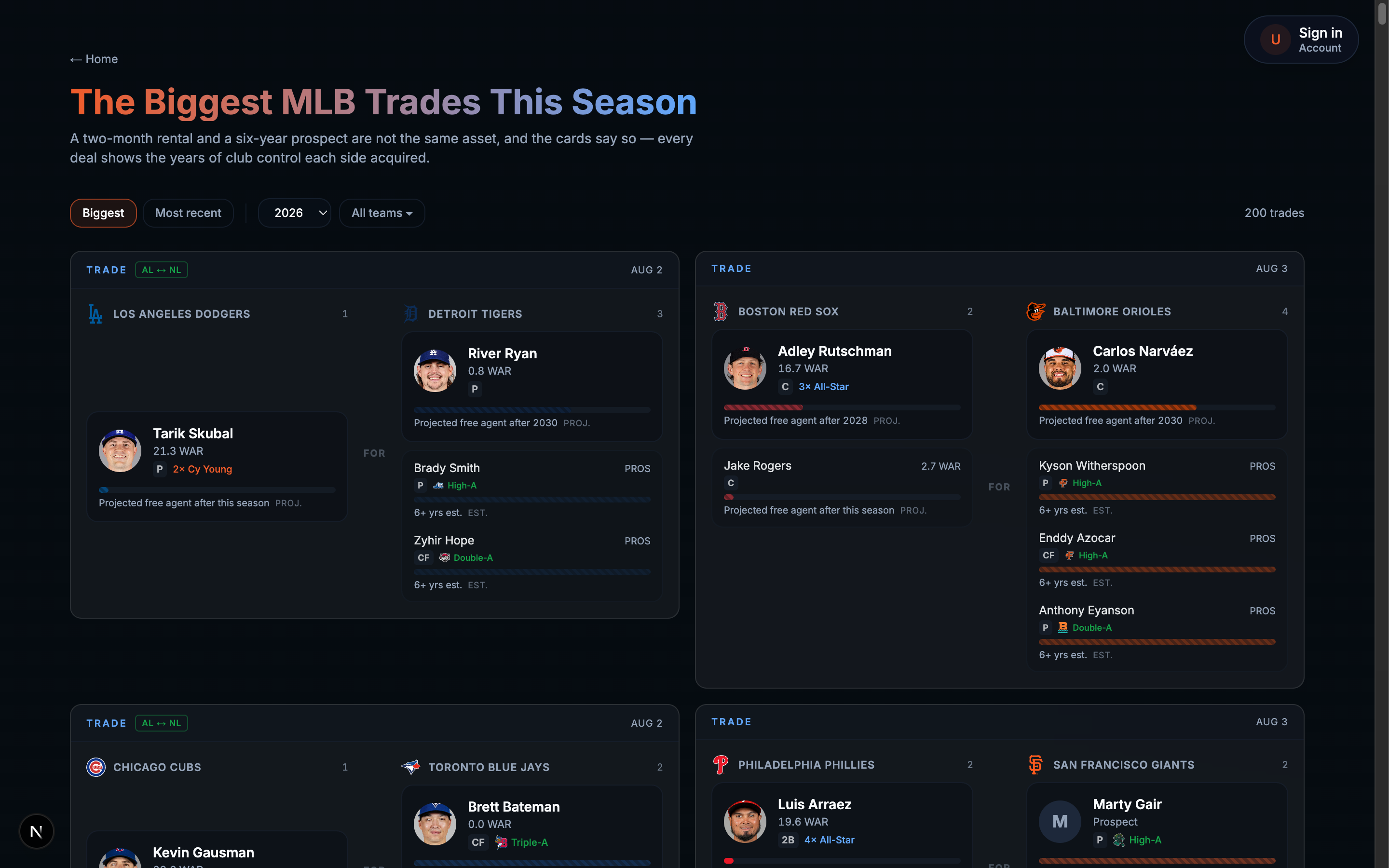
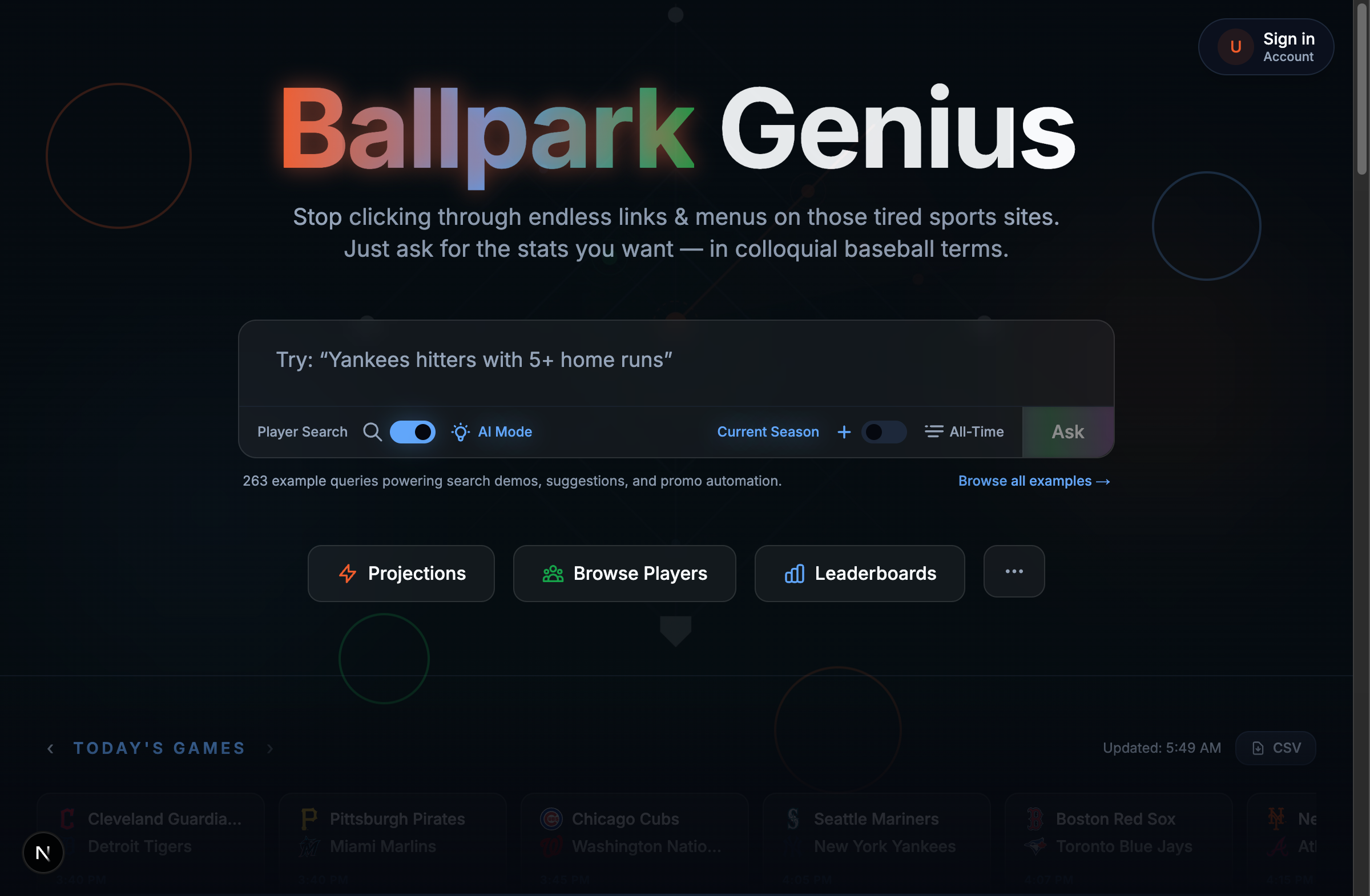
Ballpark Genius tracks MLB trades now, who went where, and how big a deal actually was. “How
big” is the fun part to get right and the easy part to get wrong: a two-month rental reliever
and a controllable six-year ace aren’t the same asset, and a naive trade feed treats them like
twins. Everyone’s read Moneyball by now, or at least seen the movie, and the lesson people took
from it was “undervalued walks,” but the deeper one was “measure the thing that actually
predicts winning, not the thing that’s easy to measure.” A trade score is the same problem,
just with more players and worse contract data.
The Skubal and Rutschman deals, the two real trades this whole build kept getting checked against.
Before any of that could matter, the transactions table had to stop lying about who was even
in a trade. Transaction.id was declared the primary key, but MLB’s Stats API id field is a
deal identifier shared by every player in the trade, not a per-person id, so a four-player
deal upserted four rows onto one id and only the last one survived. You can’t rank a trade’s
players when the database only remembers one of them. Re-keyed it to (dealId, personId) and
re-ran a historical backfill from January 2016 forward, which silently dropped 56 of 128
monthly windows on the first pass, because the API client’s schema validation swallowed any Zod
error into a bare empty array. One malformed pre-2020 record (missing a name field the schema
had marked required) killed an entire month with no error, just quietly nothing. Made the field
optional and gave the fetch a strict variant that rethrows instead of shrugging, and the re-run
landed all 132 windows clean, 513,690 transactions, 5,883 of them actual trades going back a
decade.
Control years turned out to be the part I trusted least, and I was right not to. There’s no
contract database here yet, so the estimator works off MLB debut date alone, bucketed into
EXPIRING/SHORT/MEDIUM/LONG. Before shipping it I hand-checked it against the 25 active
players with the highest career WAR, the worst-case population, since a long-tenured star is
exactly who signs an extension a debut-date-only heuristic can’t see coming. 15 of 25, 60%,
were false positives. The bucket that used to say RENTAL with total confidence now says
CONTRACT UNKNOWN, because a heuristic that’s wrong six times out of ten has no business
sounding sure of itself.
The scoring function itself, scoreBlockbuster(), blends six weighted signals, and the weights
aren’t vibes, they’re what happens when you grade 201 real 2026 trades against three candidate
models and throw out the two that didn’t match what a human would actually call “big.” Two bugs
snuck past a green test suite along the way. First: award matching was doing substring checks,
so WS_MVP, ALCS_MVP, and ALL_STAR_MVP were all scoring as a full regular-season MVP because
they all contain the letters M-V-P, and the Skubal fixture’s awardType: 'AL_CY_YOUNG' doesn’t
exist anywhere in the real schema (Cy Young is stored league-neutral, CY_YOUNG, league in its
own column), so the single highest-value award in the whole config had zero real test coverage
the entire time it was “passing.” Second, and I’d made this exact mistake once already earlier
in the same build: getPlayerTradeDeals truncated to limit: 500 before filtering to the
player being viewed, so a long-career player’s trade could get cut before the filter ever saw
it. Never truncate a set you’re about to filter. I know this now. I knew it a week ago too,
apparently not well enough.
What’s on the board today, for folks who want the short version: real WAR, real awards, and a
control-year number that’s honest about being a guess instead of a synthetic grade dressed up to
look more certain than the data underneath it actually is. I could go on about the six weights
and how each one earned its coefficient, but I digress, that’s a post for whenever I’ve derived
weight number seven.
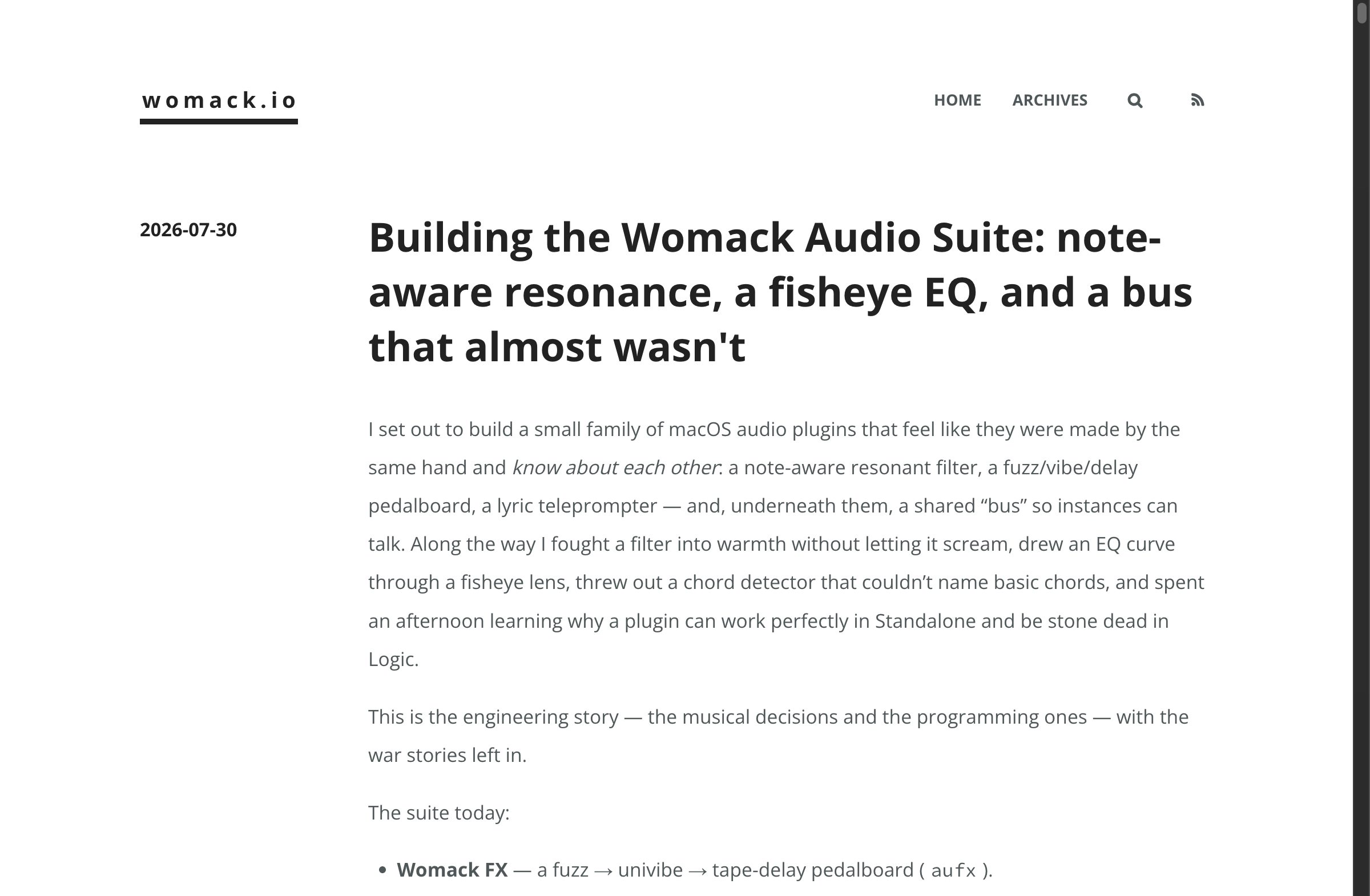
womack.io runs on Hexo and a theme called apollo, both from around 2019, old enough now that I’ve started thinking of them the way you’d think of a car that’s paid off but rattles a little. package-lock.json was gitignored this whole time, so every fresh install re-resolved every hexo-* plugin’s ^ range against whatever npm currently had. That’s how this exact site went down before: some plugin shipped a change apollo never agreed to support, and there was nothing pinning the tree to stop it.
The theme is written against Hexo 4.x’s generator and renderer APIs specifically. Upstream Hexo has moved past that, so floating a ^4.2.1 dependency was never going to be safe long-term, there was no version of “just upgrade” that didn’t mean rewriting the theme. So I vendored it instead: Hexo 4.2.1 lives at packages/hexo now, published locally as @jameswomack/hexo, installed via "hexo": "file:packages/hexo" so it lands in node_modules/hexo right where hexo-cli expects it. Every hexo-* plugin version is pinned exact, no carets, and package-lock.json is finally tracked. The tree can’t drift out from under the theme again because nothing in it is allowed to move on its own anymore.
Before trusting it I ran hexo generate under Node 20, 22, and 24 and diffed the output. Byte-identical, except sitemap.xml‘s entry order, which turned out to be non-deterministic tie-breaking on same-timestamp posts, not a real difference. .nvmrc moved to 24.7.0 for Vercel the same day.
Fifteen minutes after that landed, npm audit flagged send under 0.19.0 for a template injection XSS, GHSA-m6fv-jmcg-4jfg, reachable through hexo-server and hexo-browsersync, both of which are dev-server-only and both of which are a shell of their former selves upstream, untouched in years. No fixed version existed inside their declared ranges. Forced send to 0.19.2 and serve-static to 1.16.3 via package.json overrides. Tried jumping serve-static straight to 2.x first, that broke hexo-browsersync‘s plugin loading outright, its wrapper assumes the 1.x API, so back to the patched 1.x line instead.
Fitting, in a way, to be doing this kind of plumbing work on the same blog that’s currently telling you about it. Still finding these, four commits later it was a footer “Next »” link rendering as literal escaped text because of the same paginator helper’s default escaping. Old software has old corners.
I set out to build a small family of macOS audio plugins that feel like they were made by
the same hand and know about each other: a note-aware resonant filter, a fuzz/vibe/delay
pedalboard, a lyric teleprompter — and, underneath them, a shared “bus” so instances can
talk. Along the way I fought a filter into warmth without letting it scream, drew an EQ curve
through a fisheye lens, threw out a chord detector that couldn’t name basic chords, and spent an
afternoon learning why a plugin can work perfectly in Standalone and be stone dead in Logic.
This is the engineering story — the musical decisions and the programming ones — with the
war stories left in.
The suite today:
Womack FX — a fuzz → univibe → tape-delay pedalboard (aufx).
Womack Resonote — a note-quantized resonant filter/EQ, single- and multi-band (aumf).
Womack Lyriqueue — session-stored lyrics with a playhead-following teleprompter (aufx).
WomackBus — a shared, in-process message bus the plugins register on.
Stack throughout: JUCE 8.0.12, C++20, CMake (Xcode generator), building AU +
VST3 + Standalone, unit-tested with JUCE’s console UnitTest runner, signed and notarized
for distribution.
Part 1 — Resonote: making a filter that knows about notes
Most EQs think in raw Hz. Musicians think in notes. Resonote closes that gap: its cutoff
can snap to note frequencies, optionally constrained to a key, with a live cents-from-nearest
readout so you always know how in-tune the resonance is.
Note math you can trust
The pitch math lives in a small, pure, unit-tested header (NoteFrequency.h): MIDI↔Hz,
nearestMidi, noteName, centsFromNearest, and scale-aware snapping for chromatic, major,
and minor. Keeping it pure meant I could test the tricky parts directly instead of poking at
a filter and squinting at a spectrum.
One bug from this corner is worth calling out because it’s so ordinary: the cents readout once
showed +9.61706e-05 c. juce::String(cents, 0) doesn’t round — it formats — so a whisker
above zero printed in scientific notation. The fix was a juce::roundToInt before display.
Tiny, but it’s the difference between “precise instrument” and “toy.”
The warmth: one SVF with a tanh in the feedback
The heart of Resonote is a single zero-delay-feedback TPT state-variable filter
(ResonantSVF). It runs in Bell, Low-Pass, or High-Pass mode. The only “analog” trick — and
it’s deliberately the only one — is a tanh nonlinearity in the resonance feedback path.
That tanh does two jobs. It adds a gentle, level-dependent saturation as resonance climbs —
the “warmth” — and it self-limits, so the filter stays stable and never tips into
self-oscillation. That let me be aggressive with the resonance range. resonanceToQ maps a
normalized 0..1 knob to Q ≈ 0.5 … 75:
1
2
3
4
5
6
// 0..1 -> Q 0.5..~75, musically weighted toward the top of the range. floatresonanceToQ(float r)noexcept { r = juce::jlimit (0.0f, 1.0f, r); return0.5f + std::pow (r, 3.0f) * 74.5f; }
Cranked, it sings on a note without ever howling — because the tanh in the loop eats the
runaway energy that self-oscillation would need.
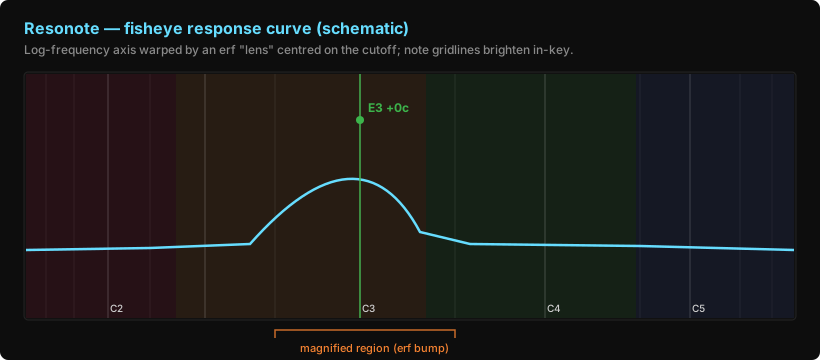
The fisheye response curve
An EQ curve on a log-frequency axis wastes its most interesting real estate: the region right
around where you’re working is cramped. So Resonote’s response display bends space. It draws
everything through a horizontal fisheye — an erf “bump” that magnifies the area around
the current cutoff and compresses the far edges — plus a subtle convex vertical bow for a
tactile “glass” feel.
Schematic illustration (not a screenshot).
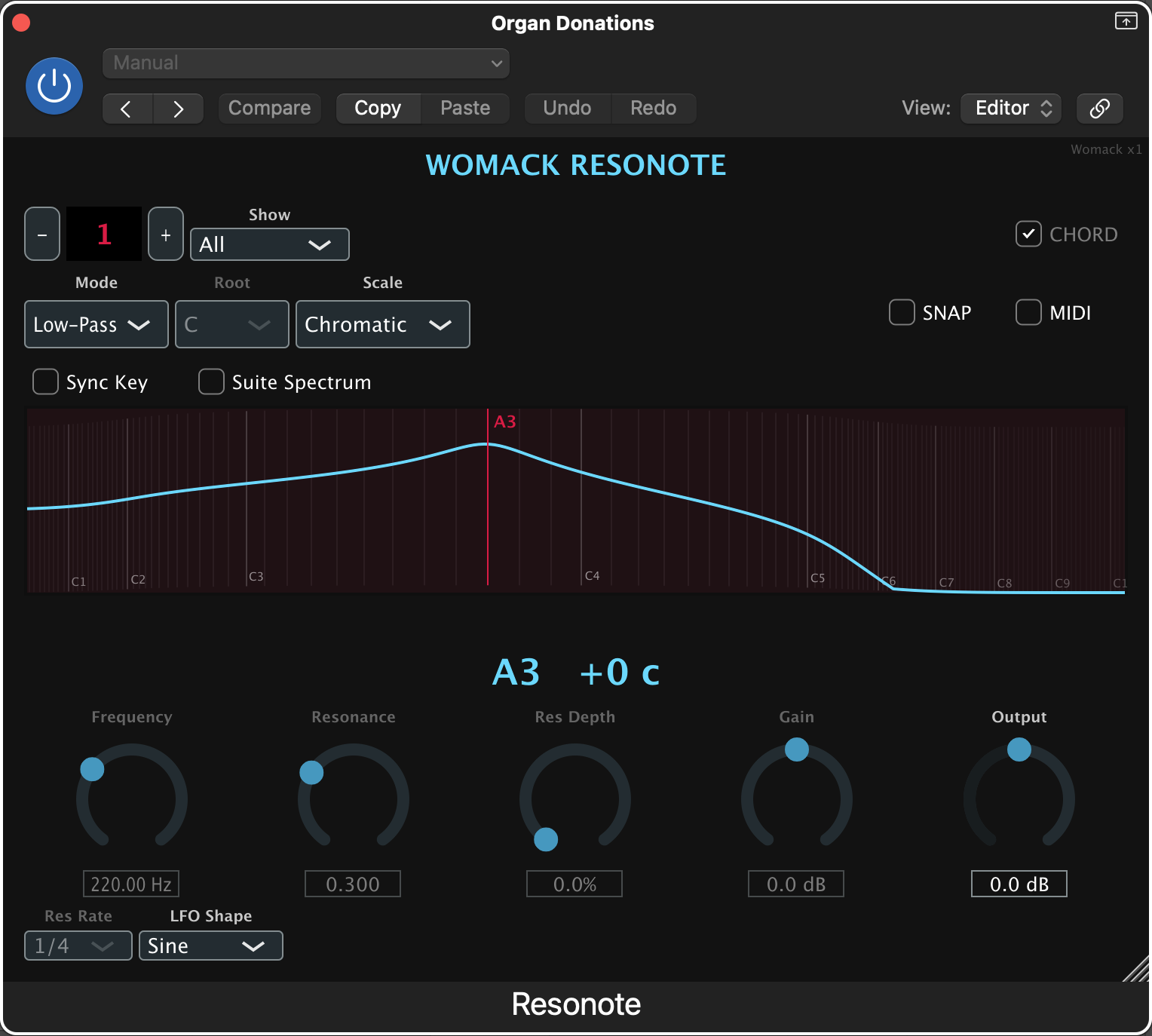
The real Resonote UI in Logic Pro — single band, cutoff snapped to A3.
The horizontal mapping from a normalized log-frequency position u ∈ [0,1] to a pixel x is:
1
2
3
4
5
6
// erf "bump" centred on u0 (the cutoff), pinned at the frame edges. floatuToX(float u)constnoexcept { constfloat bump = lensStrength * (std::erf ((u - lensU0) / lensWidth) - lensBumpAt0); return lastArea.getX() + ((u + bump) / lensDenom) * lastArea.getWidth(); }
Because uToX is monotonic increasing in u, it has a well-defined inverse — and I need
that inverse constantly: to hit-test the mouse against the curve, and to let you drag the
crossover handles between bands and have them land exactly on the boundary they control.
Rather than derive a closed-form inverse of an erf, I just bisect:
1
2
3
4
5
6
7
8
9
10
11
12
// uToX is monotonic in u, so bisect for its inverse. ~30 iterations over [0,1] // is well below sub-pixel at any realistic width. floatxToU(float x)constnoexcept { float lo = 0.0f, hi = 1.0f; for (int i = 0; i < 30; ++i) { constfloat mid = 0.5f * (lo + hi); if (uToX (mid) < x) lo = mid; else hi = mid; } return0.5f * (lo + hi); }
Thirty iterations is nothing per frame, it’s trivially correct, and it means the exact same
warp is used for drawing and for interaction. The handles never drift off the slabs they sit on.
Multiband: up to four bells that don’t step on each other
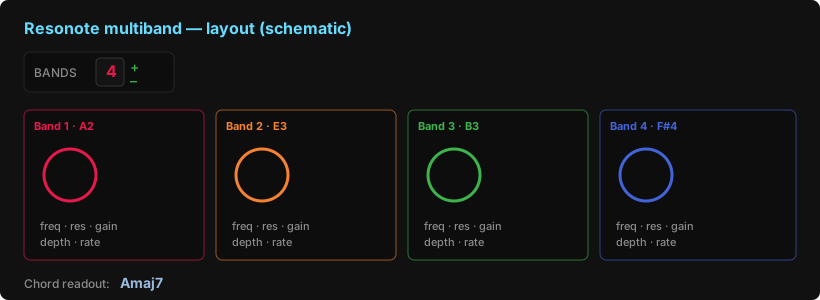
Resonote grew from one band to up to four, each a colour-coded bell with its own
frequency, resonance, and gain, and each confined to a mutually-exclusive range at least an
octave wide. A + / – LED changes the band count; adding a band auto-splits the spectrum,
after which the crossovers are draggable (through that same fisheye inverse). Each band also
gets tempo-synced resonance modulation — an LFO with a per-band depth and a host-synced
rate, plus a global shape.
Schematic illustration (not a screenshot).
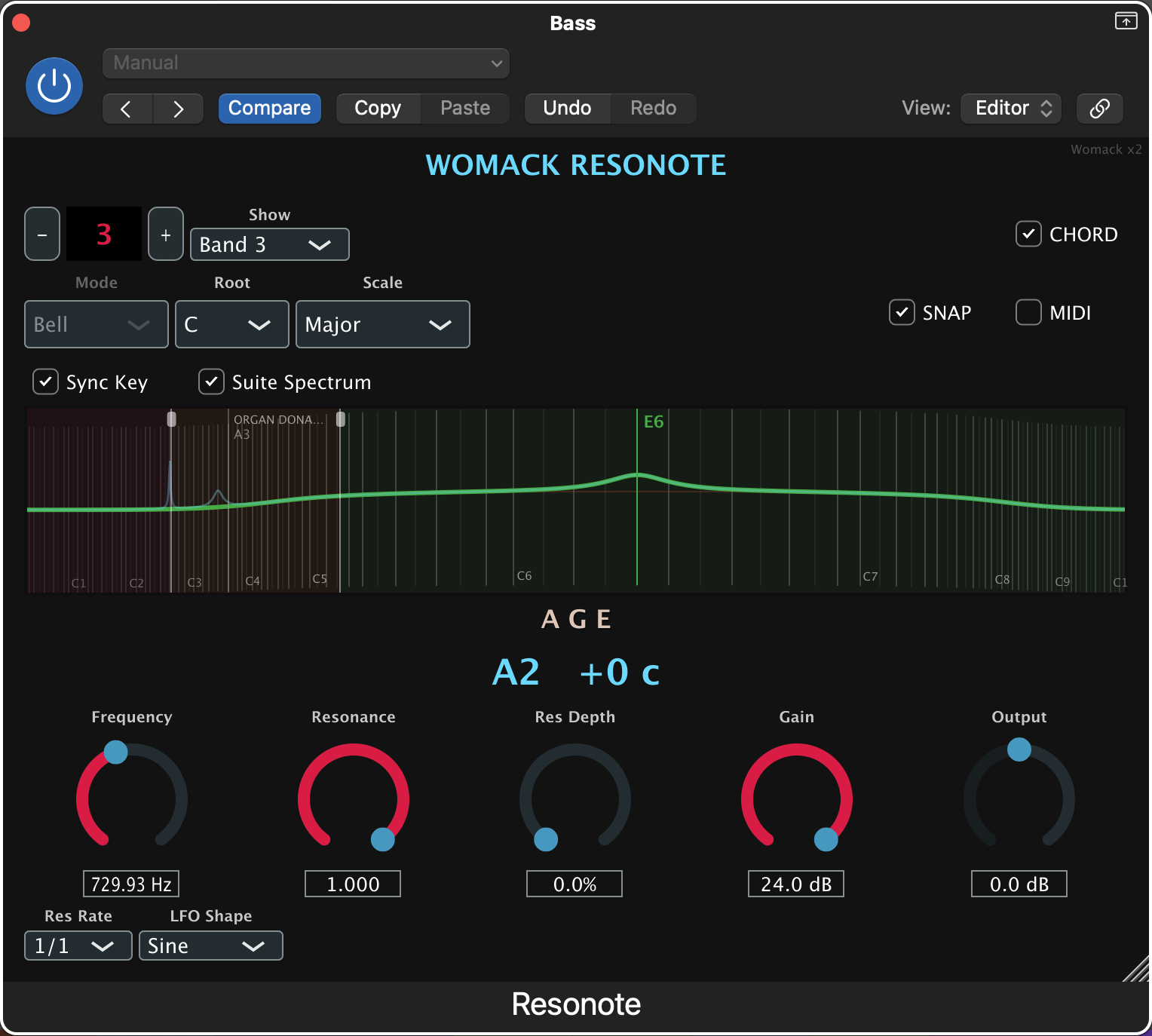
Multiband Resonote in Logic with Suite Spectrum on — the greyed “Organ Donations” ghost marker is another instance’s frequency, and the readout names the combined chord.
The chord detector I had to rip out and rewrite
The multiband version reads out the chord formed by the active bands. My first attempt was
hand-rolled, and it was simply wrong: for the notes of an F minor 7 it
displayed F +3 +5 +7 — printing raw semitone offsets as if they were chord
degrees. For a music app, that’s just not good enough.
There is no clean drop-in C++ chord library, so I ported the algorithm that the JavaScript
world trusts — tonal.js-style detection: normalize the pitch classes, then rotate through
every note as a candidate root, match the resulting interval set against known chord
qualities, and prefer the interpretation with the best root; fall back to slash-chord
inversions (C/E) and, only if nothing matches, to an honest note-name list rather than
fake degrees. Augmented-7 spells as aug7, never +7, precisely because a + had been the
symptom of the old bug.
The lesson wasn’t “chords are hard” (they are). It was: when your domain has a correct answer,
either compute the correct answer or say you can’t — don’t invent notation that looks right.
Part 2 — The Logic bug class that bit us three times
Here’s the war story every plugin dev should internalize.
Resonote’s visualizer, note readout, and chord display all read their values from small
std::atomic snapshots that were written inside processBlock. In the Standalone app that
was fine — the audio device runs continuously, so processBlock fires forever and the snapshots
are always fresh. Ship the same binary into Logic, stop the transport, turn a knob… and
nothing moves. The curve freezes. The chord goes stale. It looked broken, and only in the DAW.
The root cause: Logic doesn’t call processBlock when the transport is stopped (and only
does at all when audio flows through the track). Reading UI values from process-time snapshots
couples your interface to the transport state. The fix is a one-liner in spirit — read the
parameters directly on the message thread, not the process-time mirror — and I routed every
UI getter through a single effectiveBandFreqHz() helper so the audio path and the display can
never disagree.
It bit three times: first the band count stuck at 1, then the whole visualizer + chord
readout went inert, then Lyriqueue’s transport readout froze for the same reason.
“Works in Standalone, dead in Logic” is now a smell I recognize instantly.
The sibling gotcha: change gestures
While chasing the band-count issue I hit its cousin. Writing a parameter from code with
setValueNotifyingHostworks in Standalone and silently reverts in Logic — unless you
bracket it in a gesture:
Logic treats an un-gestured programmatic write as noise and rolls it back. Standalone doesn’t
care. Same shape of bug, same “only in the DAW” signature.
The meta-lesson: Standalone is a liar of omission. It’s a great fast loop, but the DAW is
the only ground truth. auval on every build, then quit-and-reopen Logic (it caches AU binaries
in memory) before you trust anything.
Part 3 — Lyriqueue: lyrics that follow the playhead
Lyriqueue stores lyrics in the session and shows a teleprompter that follows the DAW’s
playhead, cue by cue, in musical time. Cues are stored canonically as absolute PPQ
(quarter-notes from song start) and rendered as Bar.Beat.Ticks using the host’s time
signature. The active line is simply “the cued line with the greatest cue ≤ now.”
An early version showed impossible Bar.Beat.Ticks values; the fix was to do all arithmetic in
PPQ and convert once at the edges, so beats and ticks always roll over musically.
It’s an aufx audio effect that doesn’t touch the audio — which produced a genuinely confusing
support moment: on a silent track, Logic never processes it, so the playhead never arrives
and following looks broken. The right move wasn’t code gymnastics; it was discoverability —
a live transport readout plus a “waiting for transport” hint that appears only when the host has
never processed the track (detected with a processBlock counter that never advances), and
latches off the instant a block arrives so it never nags on a working track.
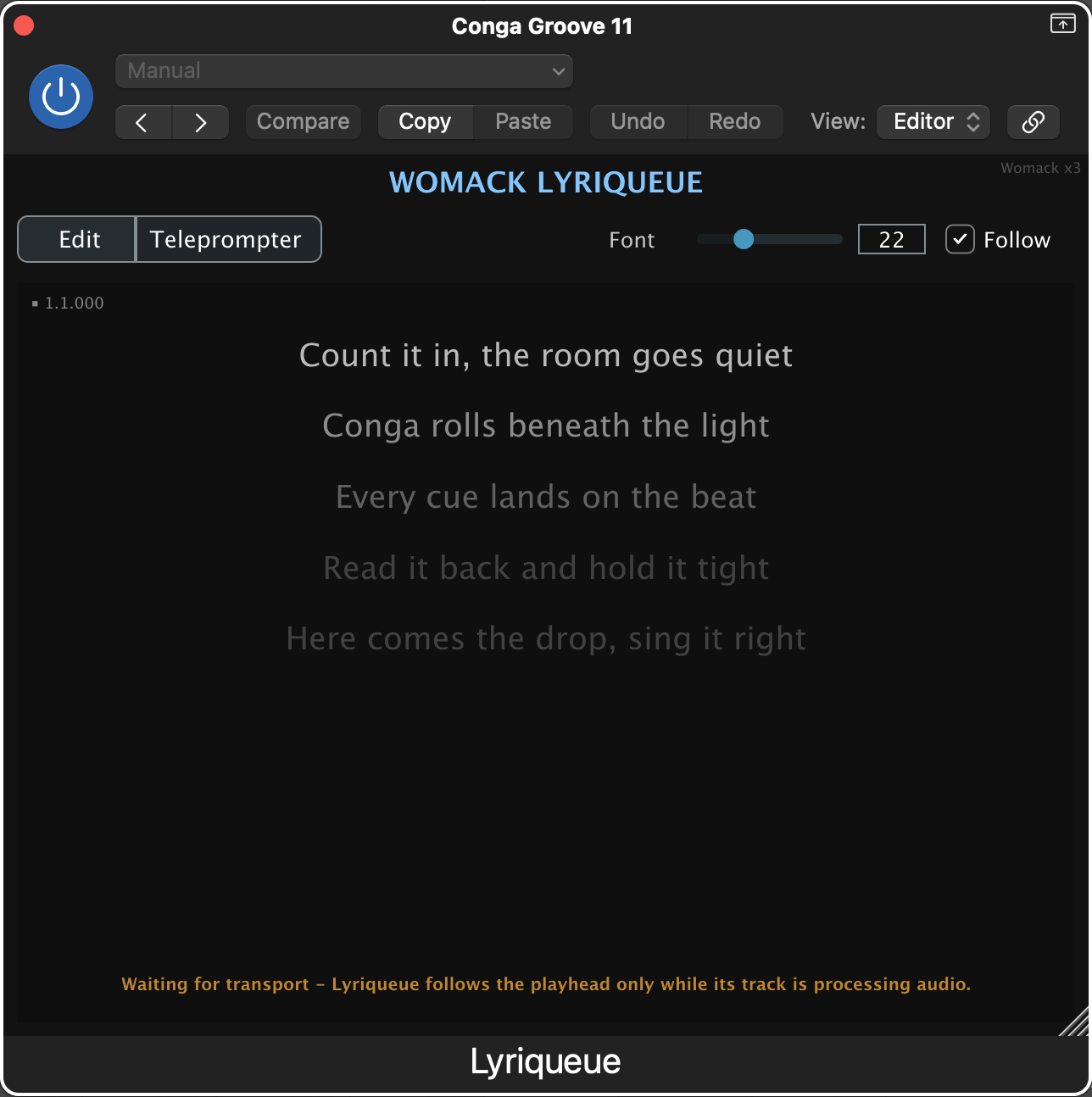
Lyriqueue’s teleprompter in Logic — the amber line at the bottom is exactly that “waiting for transport” hint.
Part 4 — WomackBus: the shared bus that almost wasn’t
This is the part I’m proudest of, because it looked done, passed its tests, and was quietly
wrong.
I wanted the plugins to be a suite — to share musical context in one process. So I built
WomackBus: a process-wide singleton with a client registry, a small blackboard, and change
listeners; each plugin owns a RAII WomackBusClient that registers on construction and
unregisters on destruction, and shows a tiny “Womack ×N” presence badge.
I built WomackCommon as a static library, linked it into each plugin, saw the badge show
×1, shipped it. The unit tests were green. The badge was… always ×1 across different
plugins.
Why static linking silently broke it
A function-local-static singleton (WomackBus::get()) linked statically into two separate
plugin bundles gets duplicated — each bundle carries its own copy. On macOS with the
default two-level namespace, strong duplicate symbols are not coalesced across separately
loaded bundles. So Resonote had one bus, Lyriqueue had another, and they never saw each other.
Two instances of the same plugin shared (same image); two different plugins did not.
nm shows it plainly — every plugin binary defined the symbol (T), instead of importing it:
1 2 3 4
$ nm "Womack Resonote" | grep WomackBus3getEv 0000000000009ea0 (__TEXT,__text) external __ZN9WomackBus3getEv # T: its OWN copy $ nm "Womack Lyriqueue" | grep WomackBus3getEv 0000000000009094 (__TEXT,__text) external __ZN9WomackBus3getEv # T: a DIFFERENT own copy
The fix: one shared, JUCE-free dylib
WomackCommon became a single shared dylib with an absolute install name under a shared
directory (/Library/Application Support/Womack for installs; ~/Library/Application Support/Womack
for dev). Every plugin records that one path, so at load time dyld maps one copy — one bus
per process. Now nm shows the symbol imported (U) everywhere:
1
2
3
4
$ nm "Womack Resonote" | grep WomackBus3getEv
                 U __ZN9WomackBus3getEv          # imported from the shared dylib
$ otool -L "Womack Resonote" | grep Womack
    /Library/Application Support/Womack/libWomackCommon.dylib
There was one more trap I designed around from the start of the rewrite: the dylib’s ABI is
deliberately JUCE-free — std::string, a plain std::uint32_t ARGB, plain structs. Why?
Each plugin already embeds its own JUCE runtime. If the shared dylib also linked JUCE and I
passed, say, a juce::Identifier or juce::String across the boundary, I’d be sharing objects
that reference JUCE’s global string pool — but there’d be two JUCE runtimes with two pools.
That’s a corruption waiting to happen. Keeping the bus boundary to std types means it links only
libc++/libSystem (verifiable with otool -L) and can’t entangle the runtimes. Plugins
convert juce::String ↔ std::string at the edge.
The installer ships the dylib as a required component (always installed), Developer-ID signed
and notarized alongside the plugins.
The takeaway: green tests are necessary, not sufficient. The bus’s logic was always
correct — N clients produce count N. What was wrong lived in the linking, a layer the unit
tests couldn’t see. nm/otool were the tests that mattered here.
Part 5 — Where it’s going: shared musical context
With one real bus in place, the suite can finally share music, not just presence. The next
piece (in progress) adds two things over the bus, both opt-in, both symmetric-peer:
Shared key — turn on “Sync Key” and changing root/scale in one instance updates the
others (with origin-id + value-compare + an “adopting” guard so it can’t echo forever).
Frequency-signature awareness — each Resonote publishes the frequencies it occupies, and
every instance can see the others’ occupied frequencies as coloured ghosts on its own curve,
with a warning when two land within 50 cents of each other. Put a Resonote on a piano and
another on an organ, and each can carve out its own spectral pocket instead of fighting
for the same one. Awareness first; you carve manually; automatic avoidance is on the backlog.
A future Womack Ex Machina on the master bus can then become the leader that drives the
whole suite — but that’s a later chapter.
How it’s built
A few process notes, because they mattered as much as the DSP:
Worktree per task. Every change happens on its own git worktree/branch; main only ever
receives tested, confirmed work. Multiple build sessions never collide.
TDD on the pure parts. Note math, band ranges, chord naming, and the sync helpers are all
pure and unit-tested (ResonoteTests, WomackBusTests) before they touch a filter or a UI.
Subagent-driven development. Larger features are executed task-by-task with a fresh
implementer per task and a spec + code-quality review after each — plus a broad review before
merge.
Validate relentlessly.auval on every build for all three plugins; nm/otool for the
linking guarantees; quit-and-reopen Logic before trusting a change.
Closing
The fun of this project has been that the musical problems and the systems problems keep
turning out to be the same problem viewed from two sides. A filter that “knows about notes” is
equal parts pitch math and a fisheye you can drag. A “suite” is equal parts a shared key and a
symbol that must be U and not T. And the recurring humbling lesson — from the scientific-
notation cents, to the F +3 +5 +7 chord, to the bus that passed its tests while being wrong —
is that looking right is not the same as being right. The DAW, the linker, and the music
theory all get a vote.
More soon, once instances can carve out their own place in the mix.
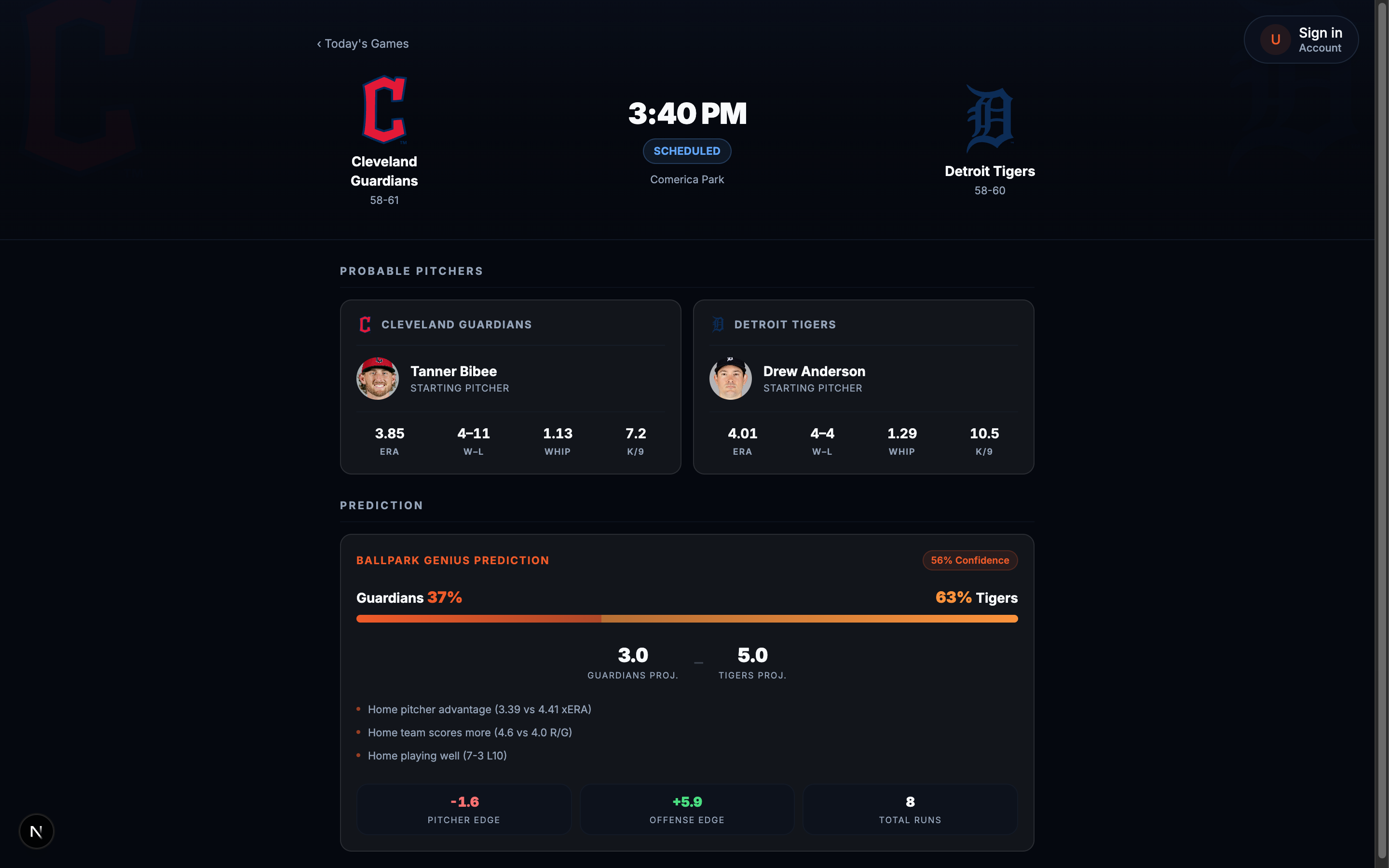
Ballpark Genius predicts MLB game outcomes, win probability, projected score, the “Pitcher
Edge”/“Offense Edge” breakdown on a game page. Underneath it is a nightly champion/challenger
loop, tune a candidate, grade it against a holdout set, promote only if it’s genuinely better.
Simple in the abstract. It took three separate, individually reasonable-looking bugs, over
about a week, before I trusted a single number it produced.
The prediction surface this loop feeds, produced by the champion model after all three fixes below.
Bug one: the holdout set had quietly stopped growing. held_out = true on a game is a persisted
flag, set only by a one-off backfill script months back, never by the daily import that keeps
adding real games. So the eval set froze at 120 games while every game since leaked into
training instead, and two eval reports run a month apart came back byte-identical to four
decimal places, which should’ve been the tell (it wasn’t, for longer than I’d like to admit).
Fixed it so importGames assigns heldOut at insert time going forward, backfilled the 67
games that had already leaked, holdout set’s at 187 now and grows on its own.
Bug two, and this is the one worth remembering the name of: the promotion gate compared
composite scores against a flat epsilon = 0.005, and per-game noise on a 180-game holdout
runs about ±0.02, four times the threshold meant to catch a real signal. There are lies, damned
lies, and a promotion gate that can’t tell a real 0.003 improvement from a coin flip that came
up heads four times in a row. It had, at least once, promoted a model on a +0.025 swing that was
almost certainly noise. Swapped the flat threshold for a paired significance test, champion
minus candidate per game, promote only when the 95% confidence interval’s lower bound clears
zero. Now a worse candidate fails honestly instead of occasionally sneaking through on a lucky
week.
Bug three is the one I’m most annoyed I didn’t see coming: the tuner that builds each candidate
was optimizing composite score on one dataset (walk-forward) and getting graded on a completely
different one (holdout). That’s not a subtle setup flaw, that’s a kid studying off last year’s
answer key and being surprised by this year’s exam. +0.017 on the sample it could see, -0.023 on
the one it couldn’t. Added a shrinkage-to-champion penalty chosen by cross-validation instead of
by hand, and watched the CV procedure land on λ=2, which is the tuner itself concluding, correctly
and a little humiliatingly, that the data doesn’t support moving off the champion at all right
now.
Anyway, I digress into the play by play too easily on this one. The order these surfaced in is the actual story. A frozen holdout makes a noisy gate look stable,
because it’s grading against the same 120 games forever. A noisy gate makes an overfitting tuner
look successful, because noise-driven promotions go through often enough to seem like progress.
Each bug was hiding behind the one before it, and I only found the third by fixing the first two
first. heuristic_v9 is near-optimal for what it has to work with now, nothing beats it
meaningfully, and that’s the gate reporting a true negative instead of a broken positive, exactly
the boring, correct outcome you want from something you spent a week teaching not to lie to you.
Dev, main, and prod all point at the same Redis and the same Postgres on Ballpark Genius. That’s not a design decision I’m proud of, it’s a decision made by “there’s only one of me and eleven of these projects.” It works fine right up until an agent decides redis-cli FLUSHALL is a reasonable way to test a cache bug in a worktree that isn’t prod.
So I wrote a PreToolUse hook. It sits in front of every Bash call and denies anything that looks destructive against those two: redis-cli DEL/FLUSHALL/SET/HSET/EXPIRE/RENAME, and psqlDROP/DELETE/TRUNCATE/UPDATE/anything with ALTER ... DROP|RENAME. Read-only and additive operations pass right through. It’s not a “no touching the database” hook, it’s a “no overwriting production by accident” hook (there’s a difference, and the difference is the whole point).
Measure twice, cut once, except an agent that’s very confident about a redis-cli one-liner doesn’t measure at all, it just cuts, and it pairs with a hook that already blocked killing or restarting the dev servers, and a step in this project’s architecture-check skill that makes me, or an agent reading the skill, state a blast-radius verdict before writing code that touches shared infra. Three separate nets for the same failure mode. I’ve watched it slip through at least once each way, and none of those times was actually the AI’s fault, for what it’s worth, it was mine, for building the shared Redis in the first place.
The honest reason I built this w/ a hook instead of a note in CLAUDE.md: instructions are advisory, hooks are not. I’d rather over-trust a shell script than a language model’s reading comprehension when the blast radius is “the database everyone’s using.” Cheers, Redis, you’ve earned a good night’s sleep.
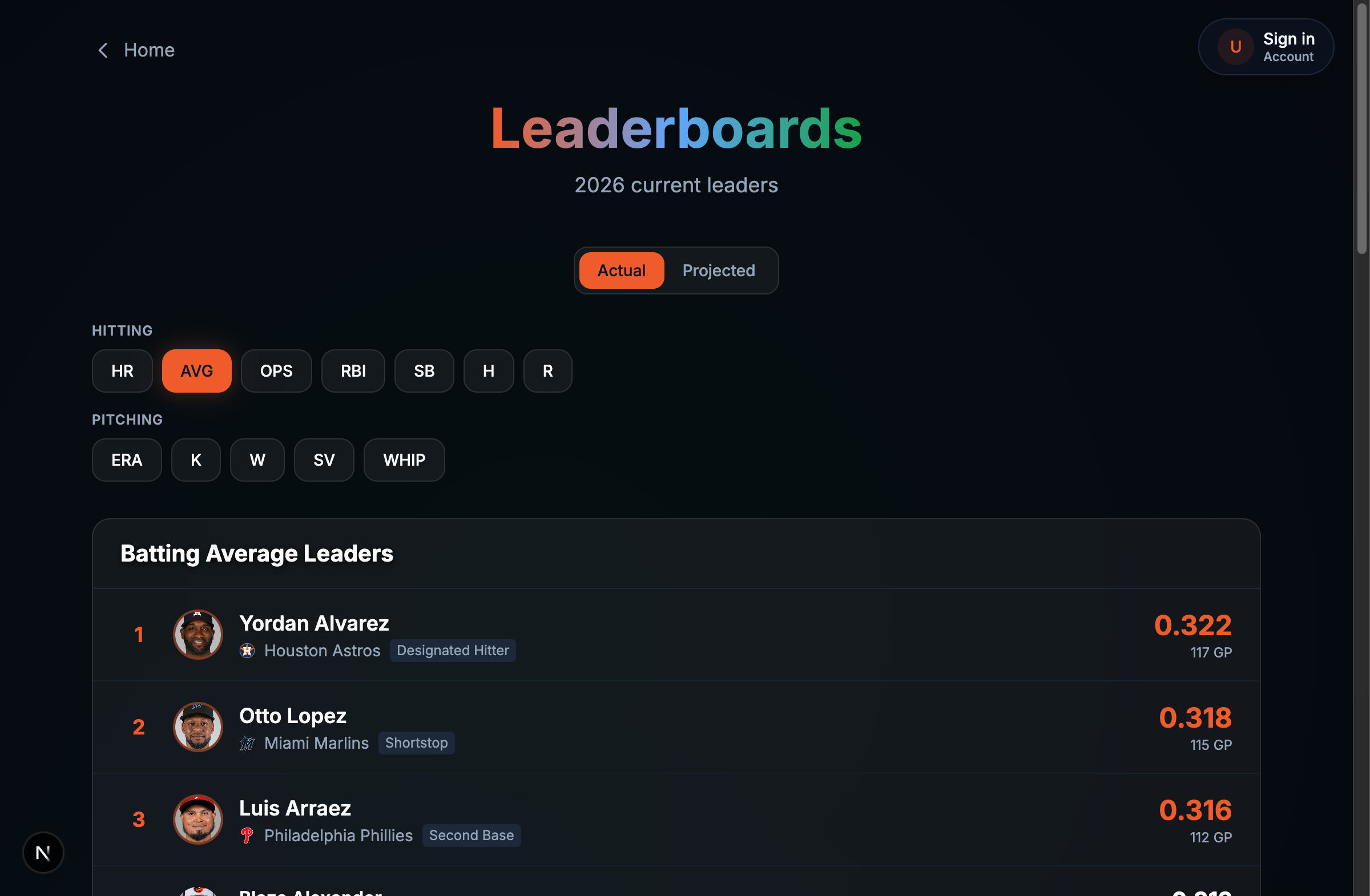
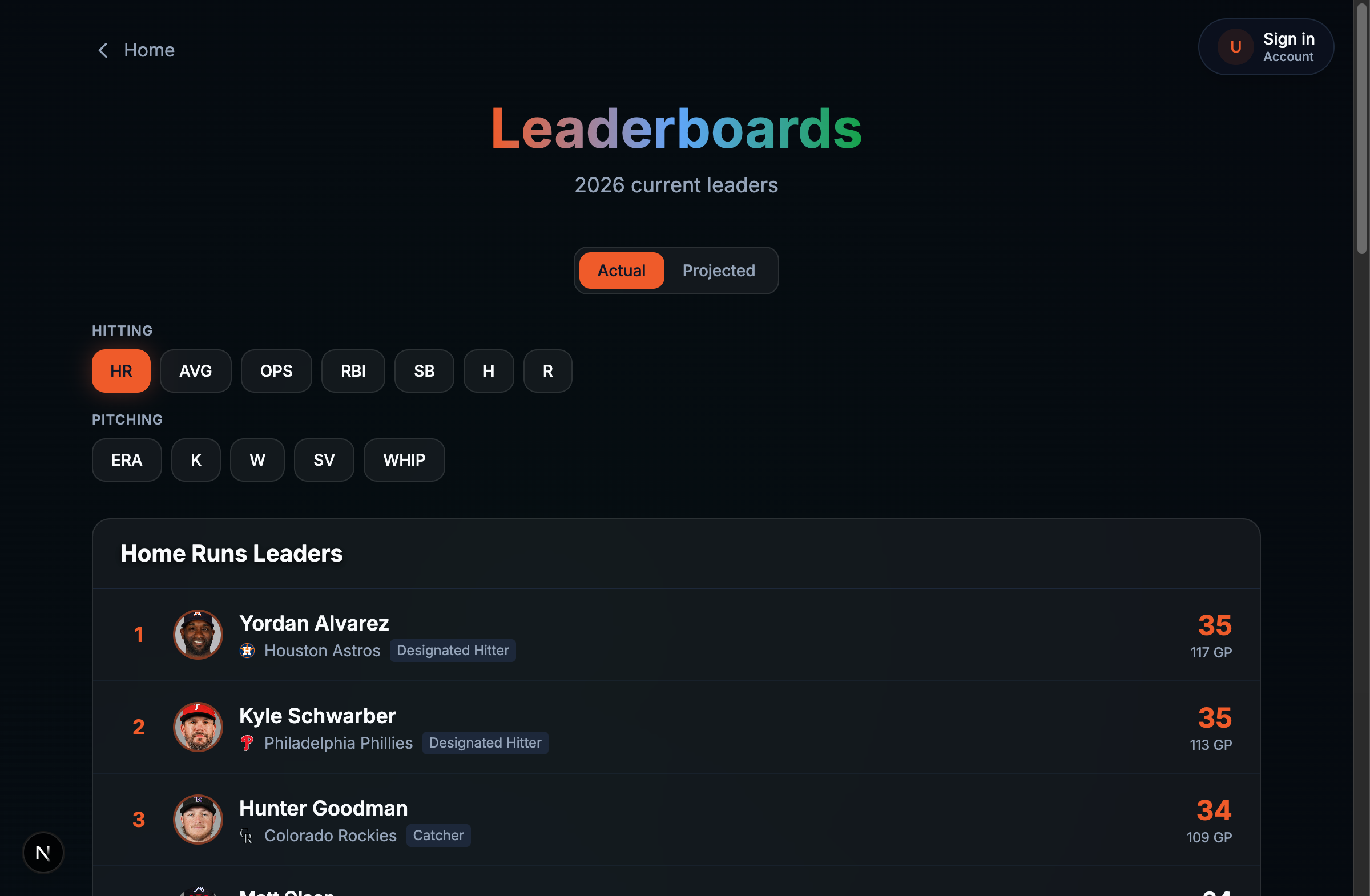
For a while, Ballpark Genius’s batting average leaderboard was topped by Justin Dean. Great glove, fine guy, 3 at-bats on the season, and for one small glorious statistically meaningless afternoon, the best hitter in baseball as far as our leaderboard was concerned. Samad Taylor (61 AB) and Tommy Edman (25 AB) were up there too. Aaron Judge was nowhere in sight.
The batting-average and ERA/WHIP leaderboards are supposed to carry a minimum sample size, at-bats for hitters, innings for pitchers, otherwise you get exactly this: someone who went 2-for-3 outranking someone who went 180-for-560. The backend already supported it. getStatsLeaders in the API client accepts minAtBats/minInningsPitched, the route maps them, the SQL applies them as AND at_bats >= N. The one place that was supposed to send them, a single call site in the leaderboards page, just didn’t. It only passed minGames.
One missing line, in other words, was the entire distance between “AVG leaderboard” and “who’s had the luckiest 3 at-bats this week.”
Fixed, and now the real floors apply, 200+ AB for AVG/OPS, 50+ IP for ERA/WHIP. Judge, Alvarez, Arraez, et al, the names you’d actually expect.
Switch stat categories on the Ballpark Genius leaderboards page and, for about 150ms, the whole table used to flash blue. Not a bug anyone filed, just a thing I kept seeing out of the corner of my eye until I finally sat down to fix it (staring at your own site closely enough to catch a 150ms flash is either dedication or a sign I should touch grass, I’ve made my peace with not knowing which).
The overlay meant to cover stale rows while new ones loaded used bg-card for its background and bg-muted for the skeleton shapes. In this theme both of those resolve to blue-tinted dark values, so every stat switch painted a blue rectangle over black-and-grey rows for a beat. Nobody designed that, folks. It’s just what two independently-reasonable Tailwind classes do once you stack them.
The fix was to stop covering the content and dim it instead: drop the skeleton overlay div entirely, set the real rows to opacity: 0.4 while fetching, block clicks with pointerEvents: none until the new data lands. Real colors stay real colors, just quieter for a moment. Skeleton rows, the animate-pulse placeholders, are still there for a true cold load with nothing cached yet. They just don’t fire on every category switch anymore.
Chasing that down surfaced a second, uglier one: switching from a hitting category to a pitching category for the first time in a session returned no cached data for that query key, so the whole table got replaced by skeleton rows instead of just dimming. Fixed by keeping a ref to the last non-empty result set and falling back to it across query key changes, so the previous category’s rows sit underneath as the background while the new ones fade in over top.
Small bug. Embarrassingly satisfying to finally kill.
Every fix in this post unblocked the next failure. That’s the honest shape of a CI week: you don’t find six bugs, folks, you find one bug wearing five disguises.
It started with GitHub Actions deprecating Node 20 on its runners, a warning on every job, while all four CI jobs still hardcoded node-version: 20 against a local/prod toolchain already on Node 24 via .nvmrc. Switched every setup-node step to node-version-file: .nvmrc so CI can’t drift from the one file that’s supposed to be the source of truth, again.
That unstuck the next one: husky‘s prepare script runs on every npm install, including Vercel’s production install, where there’s no .git directory and husky exits non-zero. Vercel deploys had been failing on that alone. Gated it behind a .git existence check.
Past that, tsc failed with about 250 errors, all downstream of one thing: nobody had run prisma generate before it. Vercel caches node_modules and skips regeneration by default. GitHub CI only worked because its build job ran prisma generate explicitly first. Added it as a postinstall and prepended it to build, so the client exists before tsc touches it in any environment. prisma generate only reads schema.prisma, no DATABASE_URL required, so it’s safe in a DB-less build too.
Then the deployed function crashed at import: winston’s File transport calls mkdirSync('logs') on construction, and Vercel’s filesystem is read-only. Gated the file transports on a serverless check (VERCEL/AWS_LAMBDA_FUNCTION_NAME) and wrapped construction in try/catch. Console transport is enough there, Vercel captures stdout anyway.
None of this makes the API actually happy running on Vercel, that’s a persistent Fastify server with node-cron and a live Redis connection, a mole I’m choosing not to whack this week, tracked and deliberately backlogged. This week was just about getting the pipeline green again without six people’s worth of “works on my machine,” and there’s always another mole, that’s the whole game.
Up to now, Ballpark Genius was entirely a look-at-the-past site, projections and season stats, nothing about the game happening right now, which is a strange gap for a baseball site to have (a bit like a sports bar with no TV, all the trivia and none of the game). Added a whole vertical for that: today.service polls the MLB Stats API every 5 minutes, imports today’s schedule, and for any game that’s gone Final since the last poll, pulls the boxscore and writes the batting/pitching lines. The MCP tool for boxscores hands back formatted text instead of JSON, so those get parsed and upserted under a synthesized retrosheet-style id, MLB{gamePk}, since MLB doesn’t have one yet for a game that just ended.
For folks keeping score at home: four endpoints under /api/today, each cached 5 minutes, and search got a new intent detector, detectTodayIntent(), that recognizes four shapes of question: what games are on today, who’s leading today, how’d a specific player do today, how’d a specific team do today. It slots into the existing semantic search response as an optional field rather than a separate code path, so “what’s the score of the Yankees game” and “who’s on pace for 40 home runs” both come out of the same box.
On the frontend, a TodayBand widget on the homepage, a game rail plus tabs for home runs, strikeouts, and total bases, refetching itself every 5 minutes via react-query. It also seeds the plumbing for live in-progress linescores, which isn’t built yet, GameCardLive already accepts a linescore prop, there’s just nothing populating it. That’s its own ticket. Shipping the “today” layer without the “live, mid-game” layer felt like the right cut. One is a poll every 5 minutes against data MLB has already finalized. The other is a websocket-shaped problem I didn’t want to solve in the same afternoon.
The Ballpark Genius CLI has a Levenshtein-based suggestion dropdown, type part of a command, it guesses the rest. Escape was supposed to back out of whatever you’re doing. Instead it quit the whole program the moment the dropdown wasn’t visible, even if you were mid-sentence typing something with real text already in the input box. You’d tap Escape out of habit, meaning “close this dropdown,” and the CLI would just leave, no goodbye, no “you sure?”, just gone, like it had somewhere better to be.
Fixed it as a priority chain instead of one flat check: if the dropdown’s showing, close the dropdown. If it’s not, but there’s text in the input, clear the input. Only quit the program if neither applies, dropdown hidden and input empty. Folks, that’s what everyone means by “hit escape” in literally every other program with a text field, and now it’s what it means here too.