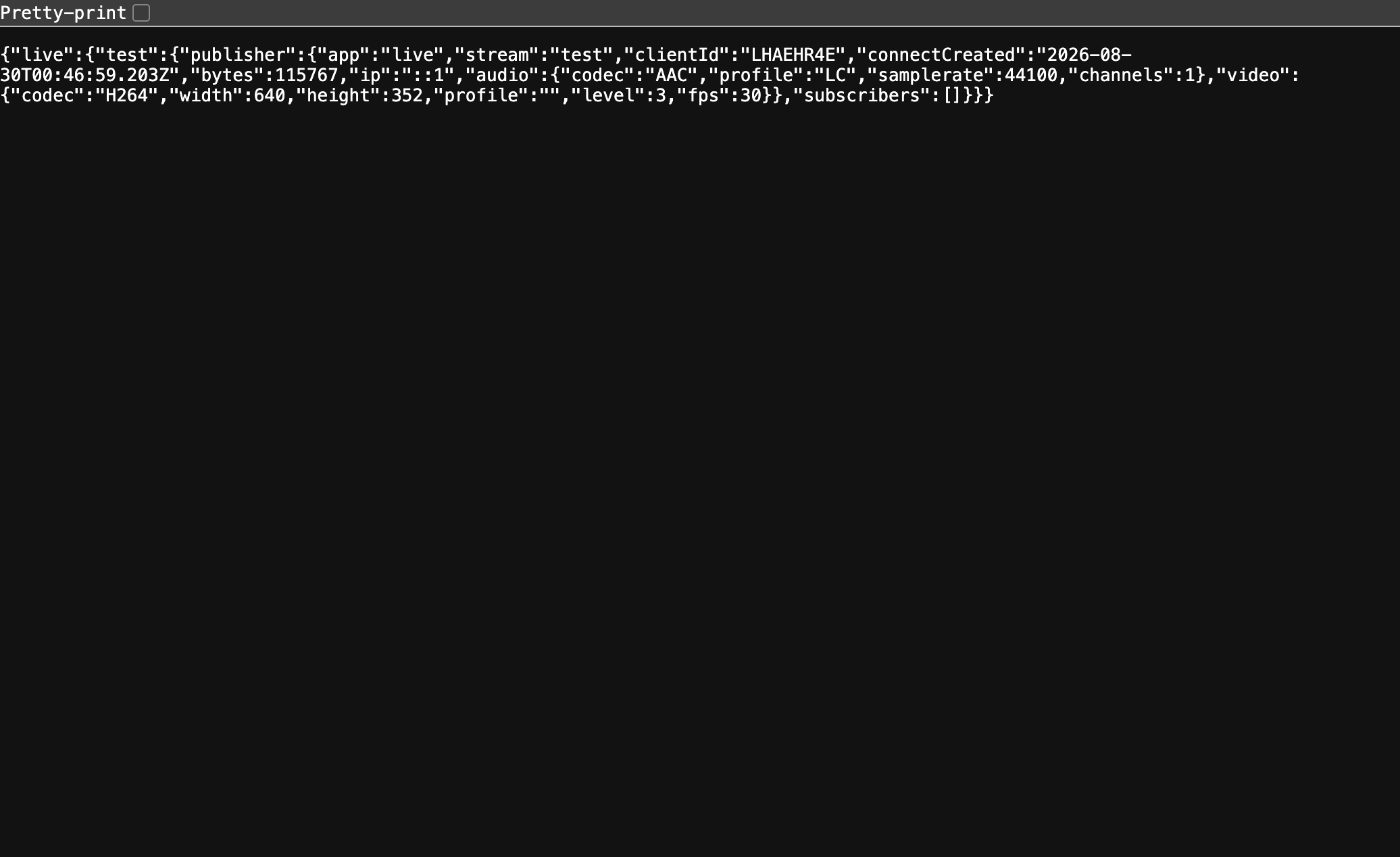
Testing an Audio Hijack streaming setup against a real RTMP destination means either paying for one or trusting your stream key to somewhere you don’t control. Neither is great for iteration, so servers/rtmp is a small node-media-server-based ingest that runs entirely on your own machine: RTMP in on :1935, HTTP-FLV and HLS out, a JSON status API on :8000 so you can see what’s actually connected without guessing.
Verified end to end with an ffmpeg publish into it, which is the only test that matters for something like this, either a real stream shows up as a real stream or the whole exercise is theater.
It didn’t stay that simple for long, though (nothing does, folks). node-media-server 2.7.0’s HLS transcoder throws 'version is not defined' the moment you try to run it, a bug in the library itself, not anything in the config wired up here. RTMP ingest and HTTP-FLV playback don’t touch that code path at all, and they’re enough to confirm a stream is real, codecs and all, so the fix was just to not ask for HLS: dropped the trans config block and its ffmpeg dependency entirely. Verified again after: continuous H.264+AAC publish accepted, /api/streams reports the right codecs, FLV playback returns 200. Smaller server, one less broken feature, same actual test coverage.
Physician, heal thyself, except the physician wrote the textbook, handed it to the intern, and
the intern still botched the diagnosis. I built JAMESISMS.md two weeks ago specifically to
stop the author-womack-post skill from sounding like a SaaS landing page with my byline on it.
Then I read the twenty posts it produced against the doc it was supposedly reading, and folks,
they don’t sound like me. Almost none of the actual vocabulary showed up, no w/, no folks
(the irony is not lost on me), no et al, no “I digress,” no clichés landed straight-faced, no
sign-offs, nothing from the corpus’s actual word list. Just competent, punchy, entirely
generic tech-blog prose with the AI tells filed off.
Went back and read SKILL.md next to JAMESISMS.md to see why, and the answer was sitting
right there once I looked for it: the skill had a whole section of banned phrases and banned
punctuation, checked by a real script, quality-gate.sh, every single time. It had nothing
that required using anything from the doc it was supposed to be voiced by. I’d built a filter
and called it a voice. Avoiding em dashes gets you to “not obviously AI.” It does not get you to
“sounds like James,” and I’m an idiot who apparently needed twenty published posts to notice the
gap between those two bars is the entire point of the exercise.
1
2
3
4
5
6
7
8
9
10
$ jamesisms-check.sh source/_posts/When-Zero-Means-Zero.md   # the pre-fix draft
contractions              8
"w/" for with              0
parentheticals             3
question marks             0
first-person density       0
ADVISORY: zero first-person words (I/my/me) on a 687-word post. This is
personal writing, not documentation, a post can have contractions and
parentheticals and still read like a product changelog if nothing in it is
actually written from a person's point of view.
8 contractions, 3 parentheticals, and still zero I/my/me in almost 700 words. That’s the
actual fingerprint of the problem, not the em dashes, the complete absence of a person standing
behind the sentences. Fixed SKILL.md so drafting step now requires picking at least 3 specific items from
JAMESISMS.md, from at least two different sections, before a single sentence gets written, not
after. Added jamesisms-check.sh, which counts contractions, w/, parentheticals against the
real corpus’s baseline rates, advisory only, since a script can count whether a word showed up
but it can’t tell you if a joke landed. And since JAMESISMS.md’s #references section calls out
actual reaction images and GIFs as a real device in the old posts, not just a described one,
added verify-image-url.sh, so a meme in a post has to be a real, resolved URL, found for real
and checked, never guessed at or remembered wrong. Used it for the first time on this very
sweep, that whack-a-mole gif a couple posts back is a real, verified giphy.com link, not a
plausible-sounding one I made up.
Then went back through all twenty posts by hand and actually used the vocabulary this time. You’re
reading the result of that pass now, in a post about the pass, which is either a little too neat
or exactly as neat as it should be, I can’t decide which.
Spent the same afternoon doing two things to this repo: adding a local RTMP test server, then porting over the .ai/-anchored spec-driven harness I’d already built for Ballpark Genius, .ai/SPEC.md as a living feature registry, .ai/CHANGELOG.md, worktree/planning/verification docs, subagents, a symlink fan-out so CLAUDE.md/AGENTS.md/GEMINI.md/.cursorrules all point at the same source of truth instead of drifting into five copies of the same rules. Good day, on paper. Two real, useful things shipped.
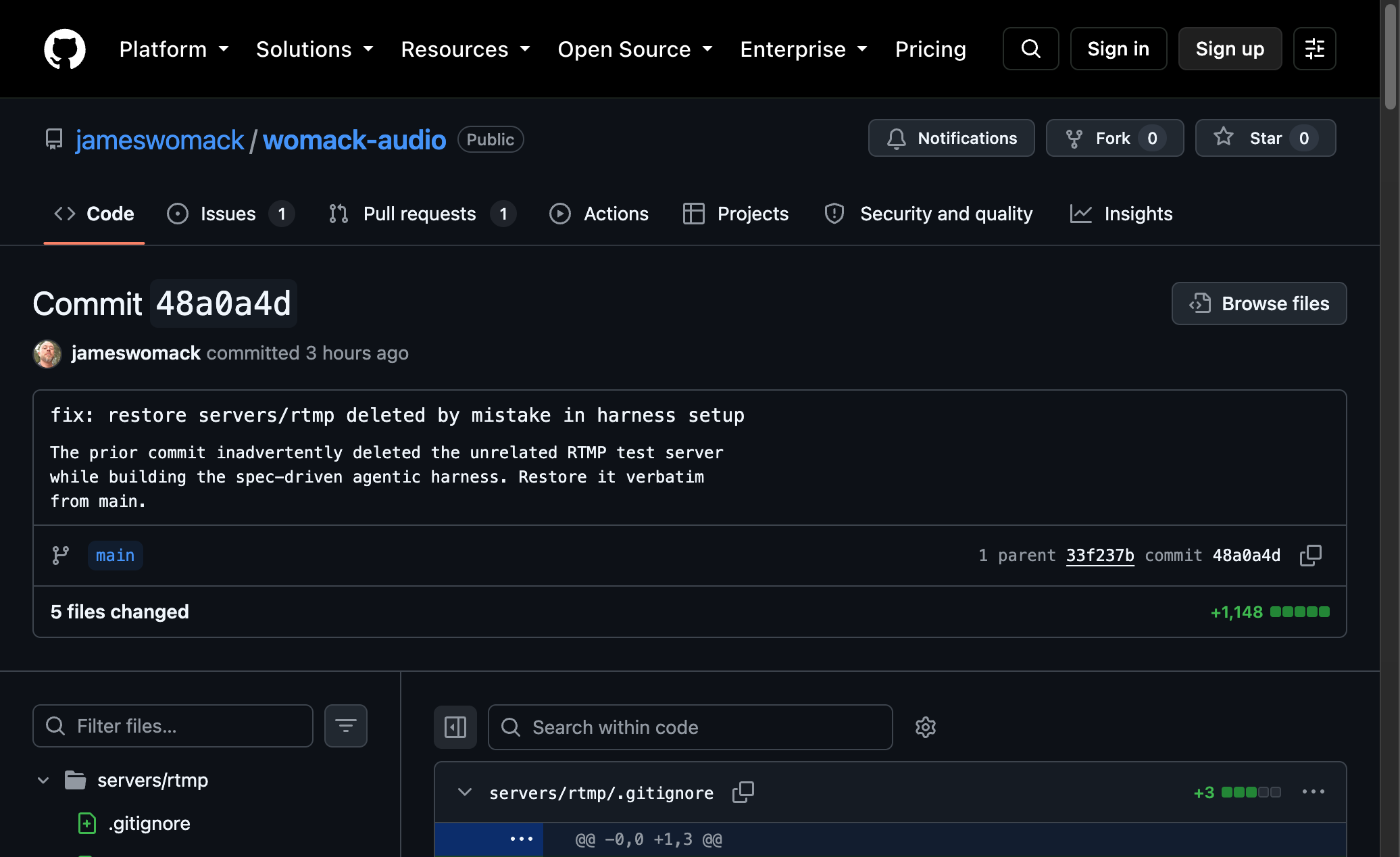
Except the harness commit deleted the RTMP server. Not on purpose, not even noticeably, server.js, README.md, both package.jsons, gone, wrapped inside a commit whose diff was 807 insertions and 12 deletions and titled “chore(ai): spec-driven Superpowers agentic harness,” a message that gives you zero reason to go looking for what it quietly removed. The harness branch had been cut before the RTMP server existed, and by the time it landed, it landed on top of it instead of alongside it.
Caught it fast, one commit later: “fix: restore servers/rtmp deleted by mistake in harness setup,” git checkout from the commit before, put back verbatim, done in under three minutes once found.
The part worth sitting with isn’t the mistake, folks, branches diverging and clobbering each other on merge is just what branches do sometimes. It’s that the thing which ate the feature was, specifically, the tooling meant to make this kind of thing harder to get away with. .ai/SPEC.md exists to track “what shipped, what didn’t.” .ai/workflows/verification.md exists to say “check before you call it done.” I ported both into this repo in the same breath as breaking the rule they’re supposed to enforce, which makes me something of an idiot for the specific, narrow reason of building a smoke detector and then standing next to it while it didn’t go off. The harness didn’t catch itself doing it. I did, on a second look. Tooling that formalizes discipline is still not a substitute for looking.
Took two separate fixes, a week apart, to notice this was one bug wearing four costumes. The Ballpark Genius CLI’s admin dashboard has a “Last Run” column reading from an ImportLog table. For transactions and player_team_refresh, it sat stuck on stale “N days ago” timestamps no matter how recently those jobs actually ran. Same story a week later for statcast and war, both stuck at “3 days ago” despite a daily launchd cron firing every single morning at 06:00.
The shape was identical every time: the handler doing the actual work, importTransactionsHandler, refresh-player-teams.ts, importStatcastHandler, importWarHandler, ran fine, mutated real data, and never once called importLogService.logImport(). The only code path that did write to ImportLog was the CLI’s own ImportRunner, which only fires when a human types /import in the TUI. So “Last Run” wasn’t lying exactly, it was answering a different question than the one on the label: not “when did this last succeed” but “when did someone last do this by hand.” The daily cron had been running statcast/war every day, correctly, invisibly, for however long, while the dashboard insisted it was three days stale.
Wired logImport into each handler directly, success with a record count, failure with the error message, matching the pattern statcast.controller.ts‘s career-war handler already used. refresh-player-teams.ts runs standalone via tsx, not through Fastify, so it logs directly through the service and awaits prisma.$disconnect() after.
Chasing the second half of this surfaced a bonus bug going the other direction: transactions was already self-logging from a prior fix, but STEP_META never got marked selfLogged: true for it, so every manual /import was writing two rows for the same run, one from the handler, one from ImportRunner parsing the shell output and assuming nobody had logged yet. Marked it. Also marked player_team_refresh, which wasn’t visibly double-logging yet only because its success text didn’t happen to match ImportRunner‘s regex, a coincidence, not a design.
Also found, while at it, that the tests covering this whole runner were already stale on main: fixtures missing two steps entirely, step numbering that hadn’t matched import-all.sh in a while, 7 tests failing before I touched anything. The dashboard was lying about freshness, folks, and the tests checking the dashboard hadn’t noticed either, which is a shell of a test suite if I’ve ever seen one.
Back in May I fixed the Ballpark Genius CLI’s escape key so it stopped quitting the whole program while you were mid-sentence in the suggestion dropdown. Turns out that wasn’t the last escape-key bug in this CLI, just the first one I’d found.
/import runs asynchronously, you can keep typing other commands while it streams progress in the background. Press Escape during one, though, and screen.key('escape')‘s fallback handler didn’t know or care that an import was running. It called this.exit(0) unconditionally, tore down the blessed screen, and killed the Node process, taking whatever import was mid-flight down with it. No confirmation, no warning, just gone.
Same fix shape as last time, a guard before the unconditional exit, except this one needed actual state to check against. When isImporting is true, Escape now opens a confirm sub-prompt, “An import is still running. Exit anyway? (yes/no)”, the same isInSubPrompt pattern the CLI already uses for restore and delete confirmations. Only an explicit yes gets you out. Anything else cancels and the import keeps running. Escape behaves exactly like it did before this fix when nothing’s importing.
Two bugs, four months apart, same root cause pattern: a key handler written for the CLI’s simplest state, escape as a blunt instrument, that never got revisited once the CLI grew actual async operations worth protecting. Folks, I’d bet there’s a third one somewhere. There’s always a third one, and I digress into predicting my own future bugs a little too easily these days.
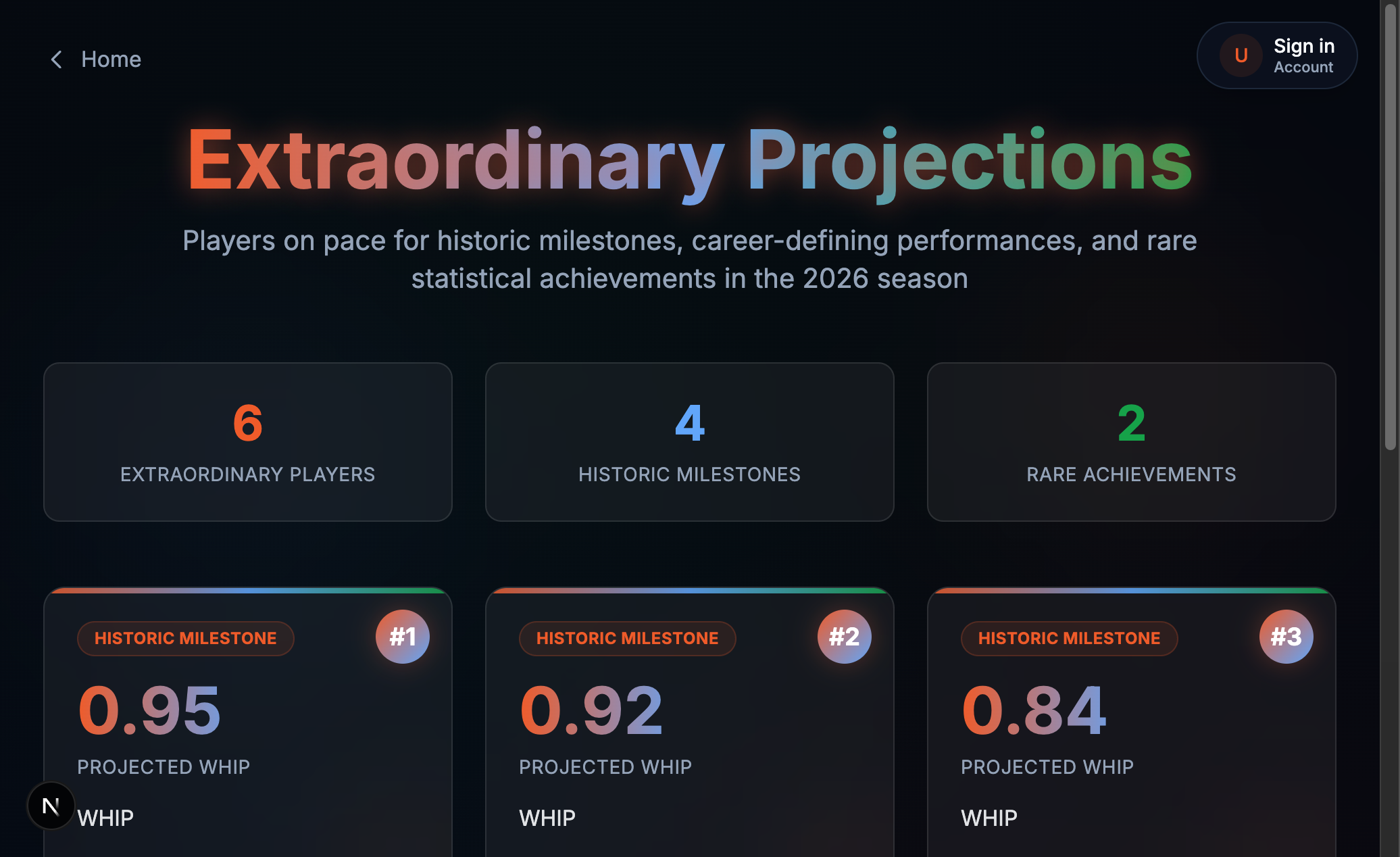
The homepage “Extraordinary Projections” widget had a tell, folks: about 30 different pitchers, all projected at exactly 350 strikeouts, or exactly 25 wins. Real projections don’t cluster on round numbers like that. Those are ceiling values, PROJECTION_CAPS.strikeoutsP and PROJECTION_CAPS.wins, and something upstream was slamming into them constantly.
The someone was projectionMultiplier, which scales a player’s partial-season stat line up to a full 162-game pace using 162 / gamesPlayedByTheirTeam. For a player whose team has actually played, say, 80 games, that’s a sane 2x multiplier. But when getGamesPlayedForTeam can’t resolve a player’s teamId, because they’re currently optioned to a minor-league affiliate with no rows in our MLB Game table, it fell back to the player’s own games-played count instead of the team’s. Ryan Weiss, sent down to the Sugar Land Space Cowboys, had 9 games logged from an earlier MLB stint. 162 / 9 ≈ 18. His real, honest partial-season line, 30 strikeouts in 26 innings, got multiplied by 18x into a projected 540-plus strikeouts, which the cap then quietly clamped to 350, and 350 he stayed, alongside every other optioned pitcher hitting the exact same failure.
Fix: when the DB fallback finds zero real MLB games for a player’s team, anchor to getLeagueSeasonGamesPlayed() for a reference franchise (Yankees, teamId 147) instead of the player’s own count. Every MLB team plays the same number of games on the same days, so any real franchise’s count is a fine proxy for season progress. A demoted player’s own tiny sample never was.
Weiss’s projection now reads 116 games of season progress instead of 9, IP down from a fantastical 468 to a plausible 36.3, strikeouts from clamped-at-350 to a real 40. No round numbers in sight, which is exactly the point.
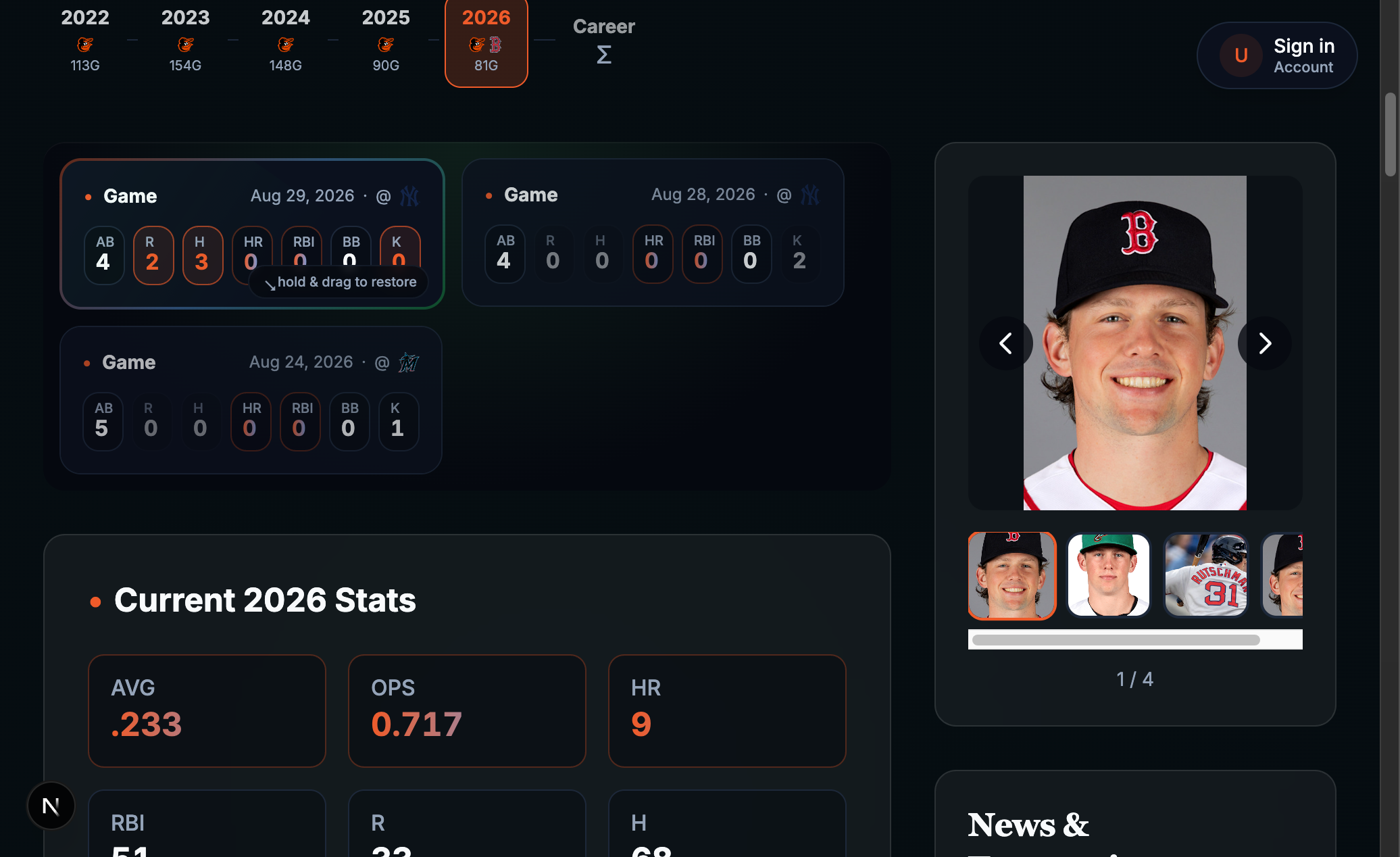
Press and hold the “Last Game” date on a Ballpark Genius player page and it deals you more games, blackjack-dealer style. A tooltip escalates as you hold, “Release for 2 games…” then 3, then 4, wobbling harder and picking up more of the site’s gradient sheen at each stage. Hold past the last threshold and you bust, “You’re out!”, and releasing gets you nothing. To put it back, hold the headline card about 450ms and drag it down and right, it tracks your pointer 1:1 with a live translate and a fade, either flinging off on completion or springing back if you let go too early.
No product requirement asked for this. It exists because a “here’s your last game” card is a pretty flat surface for a site whose whole personality is built on doing more with a stat line than a spreadsheet would, and a card shoe was sitting right there as a metaphor once “reveal more games” needed a gesture.
The backend side is one additive query param: GET /players/:id/recent-game now takes limit (1-10, default 1), and the old single-game path just calls the new multi-game one with limit=1, so there’s no fork where the single-game and multi-game views could ever describe the same game differently. Both order by gameDate desc, gameId desc, so a doubleheader stays stable across renders instead of flickering between games on a re-fetch.
The one part that took real care: per-stat emphasis, which of the revealed games had the best or worst value for a given stat, is direction-aware, not a blind numeric max/min. A pitcher’s hits allowed, earned runs, and walks are worse the higher they go, the opposite of a batter’s hits or a pitcher’s own strikeouts. Get that backwards and the card cheerfully highlights someone’s worst outing as their best one, exactly the kind of bug nobody notices until a player’s actual worst game of the year gets a little gold star.
Timing took a few passes too. The bust animation, “You’re out!” collapsing away, originally finished and vanished before there was any real chance to read it. Tuned the whole hold sequence, 0, 1250, 2250, 2900, 3250ms per stage, until you can actually see each threshold land before the next one takes over.
It’s off by default in production, on everywhere else, waiting for something worth pinning it to, a Genius of the Day, an All-Star nod. Find someone’s page and add ?games=3 to the URL if you want to see the shoe without waiting for that. Happy dealing!
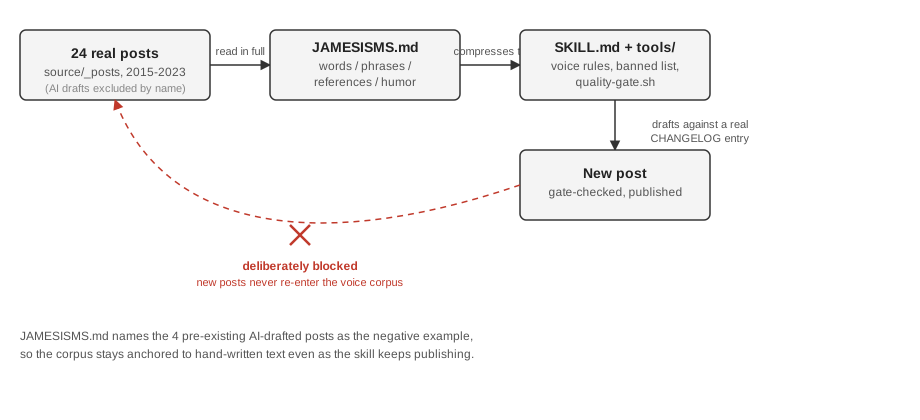
The last dozen or so posts here were drafted by a Claude Code skill, author-womack-post, reading real CHANGELOG entries from Ballpark Genius and writing them up. The first batch it produced read like a SaaS landing page with a byline. Heavy H2s, a closing paragraph that restated the whole post, “it’s worth noting” three times a page. Not me. So before writing another word, the fix was to have it actually read me first, all 24 hand-written posts on this blog, and build a reference file, JAMESISMS.md, out of what showed up: the words I reach for, the sentence shapes, the jokes, the way a post just stops instead of wrapping up with a moral.
I didn’t build the harness for that from scratch. Three repos did the thinking for me, and I forked all three rather than pretend I invented the idea:
getlago/inside-lago-voice-skill, Anh-Tho Chuong’s template, gave me the shape: Voice, Core Rules, an Anti-Filler Checklist, a Drafted-vs-Sent section for capturing the gap between an AI draft and what you’d actually send. JAMESISMS.md‘s four sections are a direct descendant of that template’s seven.
lumizone/blog-writer-claude-skill supplied the part that actually made the old posts sound bad in the first place: a table of AI tells and their human fixes, banned em dashes, banned “let’s dive in,” banned “not just X, it’s Y.” SKILL.md‘s banned list and its grep-based quality gate both come straight from that table.
aaddrick/written-voice-replication is the most over-engineered of the three, a 26-report pipeline running VADER sentiment and Big Five personality inference over someone’s Reddit export, but the compact payoff at the end, a voice spec with numeric sentence-length targets and a self-verification checklist, is the shape SKILL.md ended up in.
None of the three fit as-is, folks. Lago’s template is for a founder writing LinkedIn posts to prospects. The blog-writer skill wants an eyebrow, a TL;DR box, and FAQ JSON-LD, structure that would be exactly the wrong AEO-flavored skeleton for a Hexo blog from 2015. The Reddit pipeline assumes you have 26 reports’ worth of psycholinguistic data lying around, and I have 24 blog posts and a vibe. So JAMESISMS.md and SKILL.md took the parts that transferred, the anti-filler instinct, the numeric-targets instinct, and none of the parts that didn’t.
Here’s the pipeline as it stands:
Schematic illustration (not a screenshot).
That red X is the part I want to think through, because it’s the actual interesting question here, not “can AI write like you” but “what happens on the tenth iteration.” If a new post the skill writes could get fed back into the corpus that trains the next version of the skill, you get something close to what the ML literature calls model collapse, a system that trains on its own output slowly forgets the edges of the original distribution and converges on an average of an average. Applied to a voice: my jokes, which land because they commit a beat past where you expect them to stop, would get sanded down toward whatever reads as safely on-brand. Fifty iterations in, “JAMESISMS” stops describing me and starts describing a smoothed-out impression of me, one that’s never surprised by anything because it was never trained on anything surprising in the first place.
JAMESISMS.md already refuses that loop, though not because I sat down and designed against model collapse specifically, more because the AI-drafted posts were just obviously worse and I didn’t want the skill learning from its own mistakes. The corpus notes section names the four AI-written posts and excludes them on purpose, calling them “the negative example, not the model.” That’s the whole mechanism. It’s a denylist, not a philosophy, and it has real gaps. Nothing stops next year’s 40th post, hand-written by me, having absorbed some of the skill’s cadence back into my own writing, at which point the corpus is contaminated from the source, not the output, and there’s no grep for that. Nothing versions the corpus either, so if my actual voice drifts over the next five years, the skill has no way to know it’s still optimizing for 2026-James against 2015-through-2026-James’s average.
What ranthebuilder.cloud’s piece on writing with Claude in your own voice gets right, and what I’d underweighted until building this: “the problem isn’t that people use AI to write, it’s that they don’t configure it to sound like them.” That’s basically preaching the good word, and I believe it. But it turns out configuring is necessary and not sufficient, which is a lesson I’d bet gets its own post eventually, given how this one’s already going. The harder problem, the one none of the four repos I leaned on really solve, is staying configured. A voice isn’t a fixed target you calibrate against once. It’s a moving one, and the calibration file doesn’t know it’s supposed to move, and neither, it turns out, does the thing reading the calibration file.
Ballpark Genius’s search bar takes plain English, “players with 30 or more home runs,” “who’s on
pace for 40 steals,” and an LLM turns it into a structured filter against Postgres. LLMs being
LLMs, they occasionally hallucinate a filter nobody asked for, a stray
{ stat: 'plateAppearances', value: 0, direction: 'above' } bolted onto an otherwise fine parse.
“0 or more” is meaningless as a filter (everyone has 0 or more plate appearances, that’s the
whole species) and it can null out an entire result set through the JSON-path it compiles into.
So there’s a stripper that deletes any parsed threshold where the value’s exactly 0.
Nothing comes from nothing, King Lear says, except apparently a search stripper doesn’t know the
difference between “nothing” and “the user typed zero on purpose,” and it ate both.
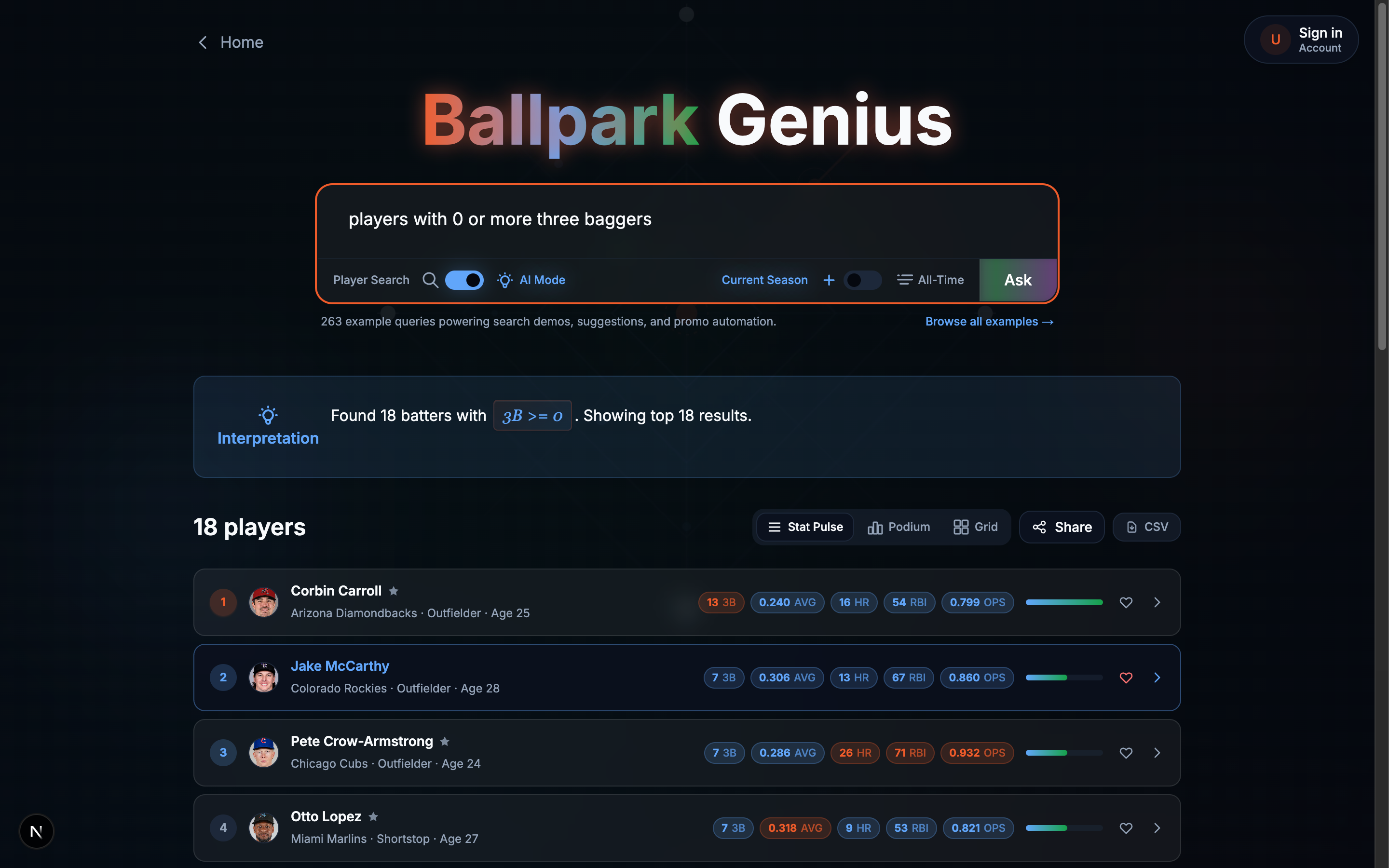
“Players with 0 or more three baggers,” a real query that used to come back empty for no good reason.
Type “players with 0 or more three baggers” and the LLM parses it to the exact same shape as the
hallucinated placeholder: { stat: 'triples', direction: 'at_least', value: 0 }. Nothing in that
object says which one it is. The stripper had no second signal, so it deleted both, every time.
“1 or more” always worked fine, since value === 0 never matched, which is exactly why nobody
noticed, a “0 of something” query feels like a null query even when it very much isn’t one.
Losing the threshold broke more than the threshold, too: sortBy downstream gets inferred from
whichever *_min/*_max key survived the parse, so strip the threshold and there’s nothing left
to sort by, a request for the top 20 quietly stopped showing the top 20 with zero errors anywhere
to say so.
1
2
buildFallbackToolArgs("players with 0 or more three baggers", 'player')
// -> { stat: 'triples', direction: 'at_least', value: 0 }  (now survives)
Fix gave the stripper a second source of truth: before deleting a zero threshold, re-check that
stat’s own regex (THRESHOLD_PATTERNS, already used earlier in the same pipeline to parse the
query in the first place) against the raw text the user typed. An explicit “0” in the sentence
survives. No textual basis anywhere, it gets stripped as the hallucination it almost certainly
is. Same parsed shape either way, but the decision now depends on what the person actually wrote
instead of a blanket rule about a single number, which is a pretty good general policy, folks,
for distrusting anything an LLM hands you unprompted, including its own generated placeholders.
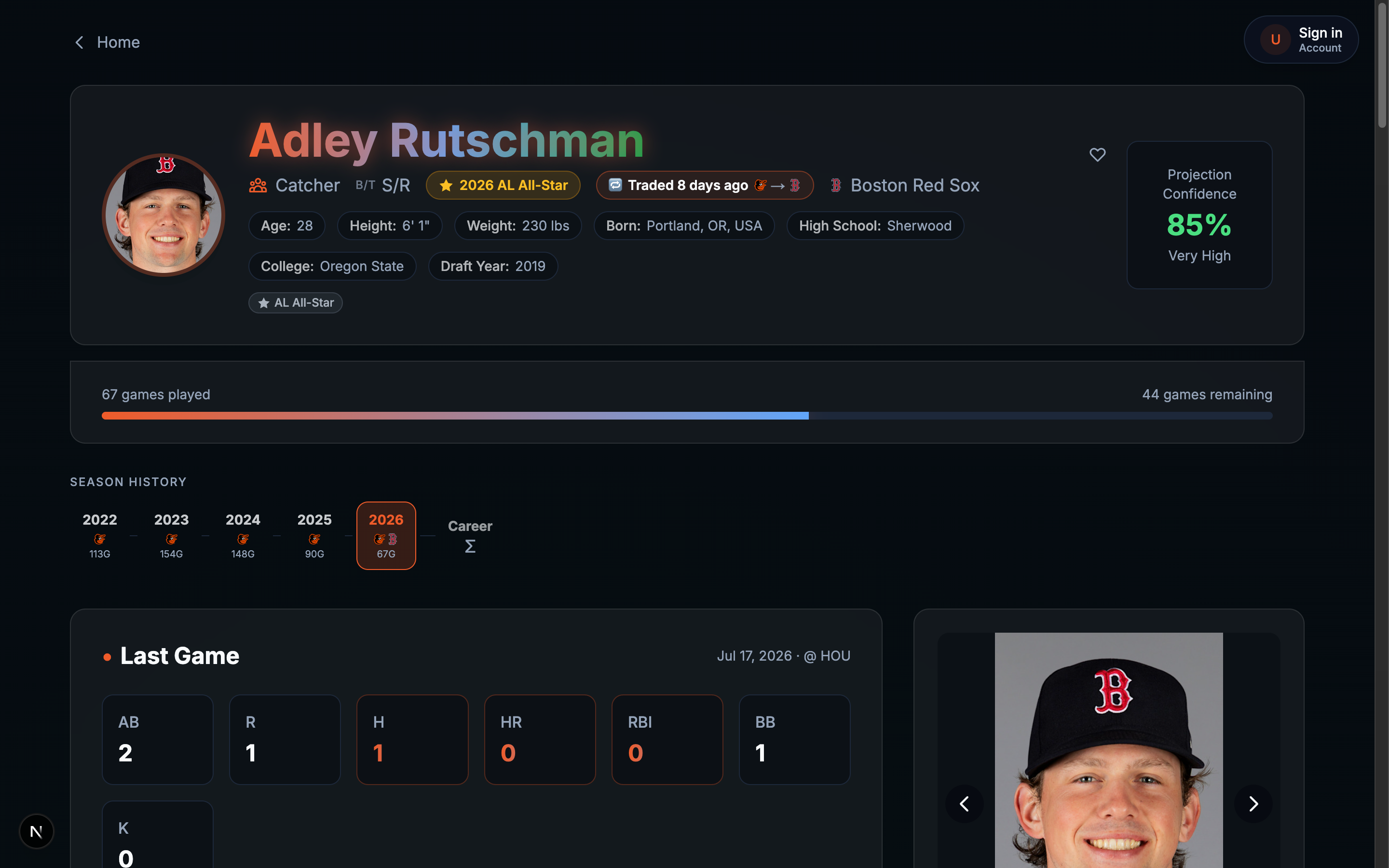
Adley Rutschman still showed as an Oriole five days after Baltimore traded him to Boston. Chasing
that one symptom turned into three separate bugs, each one hiding perfectly behind the last. None
of them threw. None logged an error. Every single one printed a success message while doing
nothing, or the wrong thing, which is a much worse failure mode than just crashing, because a
crash at least has the decency to tell you something’s wrong.
The state all three bugs conspired for a week straight to prevent.
First theory was stale cache. Ran the project’s clear-cache script, expected a clean slate, got
the same stale data back. Ran it again. ✓ cleared, it said, cheerfully, both times.
The server runs NODE_ENV=development, writes keys under development:*. The CLI script, run
from a plain shell with no env var set, resolves to dev:, deletes zero keys under a namespace
that doesn’t exist, and reports success anyway, because delPattern returned void and a
zero-match delete looked identical to a real one. Found it by going around the tool entirely,
redis-cli EXISTS before and after a “successful” flush, keys still sitting right there. Made
delPattern return the actual count deleted from here on, ⚠️ 0 entries cleared reads nothing
like ✓ cleared, and this had apparently been the standing, wrong explanation for a whole class
of “why didn’t my fix take effect” reports on this project. The fix everyone reached for first
had never once worked.
With caching ruled out, the database itself said Baltimore. A trade sync had correctly written
Boston days earlier, so something was writing it back, and that something turned out to be a
stats importer, a job that pulls a player’s current-season splits and, as a side effect nobody
asked for, decided it also owned his team assignment:
1
2
3
4
// Update player's team if this is the most recent MLB team ...
if (player && teamId && teamName && season === CURRENT_SEASON && isMLBTeamId(teamId)) {
  await prisma.player.update({ where: { id: playerId }, data: { teamId, teamName } });
}
The comment says “most recent.” There’s no recency check anywhere in the block, just whatever
split MLB’s API hands back next. Rutschman had two Baltimore rows for 2026 and zero for Boston
(straight to the injured list, no game played yet), so every re-sync, including one triggered by
someone just viewing his page, propped Baltimore back up like it never left.
Weekend at Bernie’s, but for a teamId column. Made the write fill-only, populate a missing team, never overwrite an
existing one, and repaired the 51 other players this exact path had quietly reverted.
A third bug, and I promise this is the last of them, was feeding the same symptom, found a couple days earlier in the same chase:
fix-milb-teams saw Rutschman parked on a non-MLB affiliate, assumed that meant broken, and
“corrected” it by picking whichever MLB club he’d played the most games for historically, which
for someone traded five days ago is always the old team. MLB’s API does hand back the real answer
directly as currentTeam.parentOrgId, but the Zod schema for that payload never declared the
field, and Zod drops unknown keys by default, so the correct value arrived and got silently
thrown away before any code of mine ever saw it. My first draft of this fix read parentOrgId,
got undefined, and would’ve quietly kept the broken logic while looking fixed, caught only by
checking the parsed output against the raw response instead of trusting that adding a schema
field was enough on its own (it is never enough on its own, and I know that, and I still nearly
shipped it anyway).
Fifty-two players had a genuinely wrong team after that repair. Two hundred seventy-six flagged
by the detection query were false positives, guys like Verlander and Scherzer whose team
correctly differs from an old trade because they’d moved again on their own since. The script
checks with MLB before touching anyone, so only the real 52 changed. Three bugs, one Oriole who
was actually a Red Sox the whole time, and a week where every fix I tried made the next bug look
like a completely different problem.